From understanding concepts to building systems - this comprehensive guide takes you through every component needed to build reliable, production-ready AI agents.
Introduction: From Theory to Implementation
Building an AI agent isn't about chaining a few LLM calls together and hoping for the best. It's about understanding the fundamental mechanics that make agents actually work in production environments.
If you've experimented with agent frameworks like LangChain or AutoGPT, you've probably noticed something: they make agents look simple on the surface, but when things break (and they will), you're left debugging a black box. The agent gets stuck in loops, picks wrong tools, forgets context, or hallucinates operations that don't exist.
The problem? Most developers treat agents as magical systems without understanding what's happening under the hood.
This guide changes that. We're deconstructing agents into their core building blocks - the execution loop, tool interfaces, memory architecture, and state transitions. By the end, you'll not only understand how agents work, but you'll be able to build robust, debuggable systems that handle real-world tasks.
What makes this different from other agent tutorials?
Instead of showing you how to call agent.run() and praying it works, we're breaking down each component with production-grade implementations. You'll see working code for every pattern, understand why each piece matters, and learn where systems typically fail.
Who is this guide for?
AI engineers and software developers who want to move beyond toy examples. If you've built demos that work 70% of the time but can't figure out why they fail the other 30%, this is for you. If you need agents that handle errors gracefully, maintain context across conversations, and execute tools reliably, keep reading.
The Fundamental Truth About Agents
Here's what most tutorials won't tell you upfront: An agent is not a monolith - it's a loop with state, tools, and memory.
Every agent system, regardless of complexity, follows the same pattern:
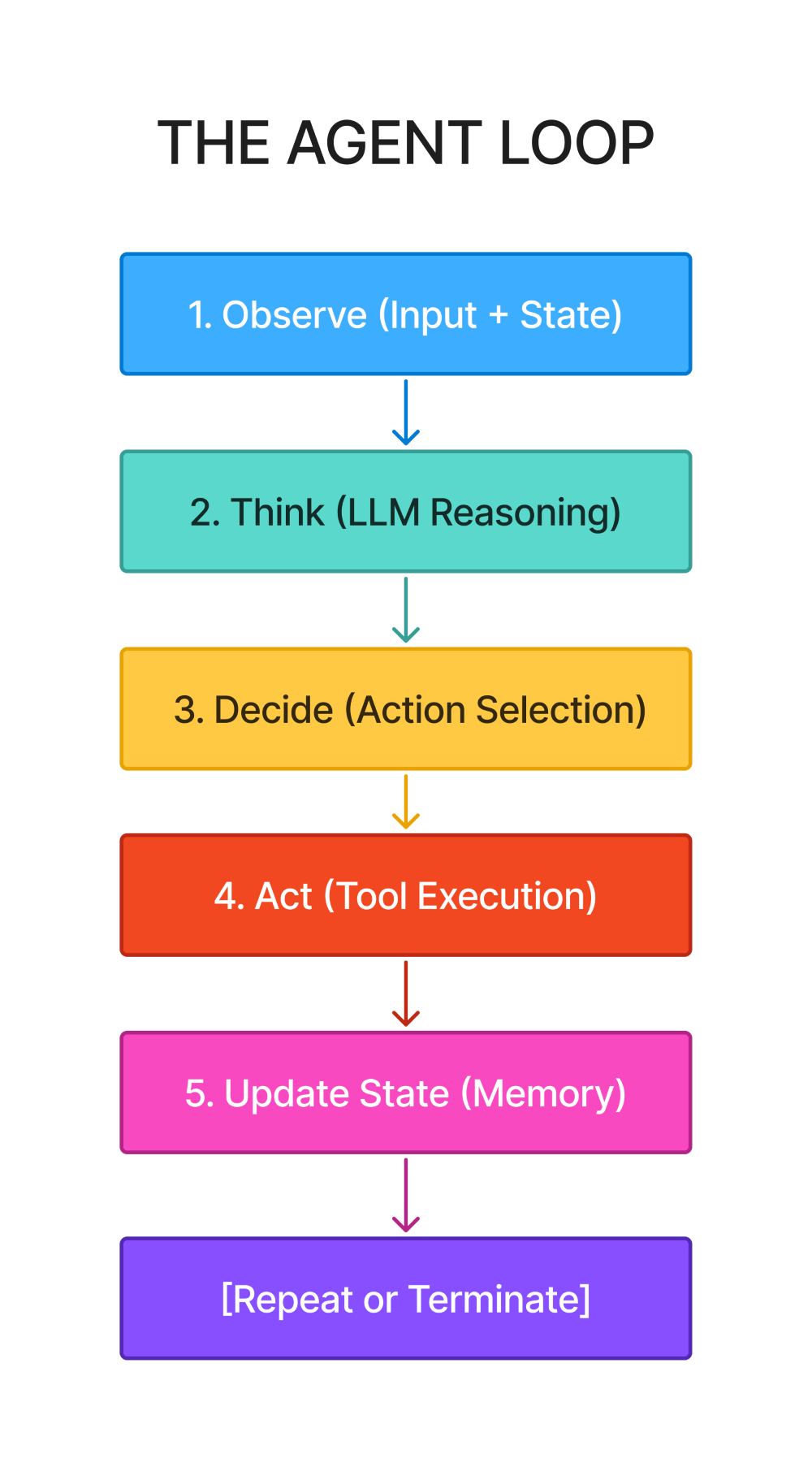
This six-step pattern (five actions plus termination check) appears everywhere:
-
Simple chatbots implement it minimally
-
Complex multi-agent systems run multiple instances simultaneously
-
Production systems add error handling and recovery to each step
The sophistication varies, but the structure stays constant.
Why this matters for production systems:
When you call agent.run() in LangChain or set up a workflow in LangGraph, this loop executes behind the scenes. When something breaks - the agent loops infinitely, selects wrong tools, or loses context - you need to know which step failed:
-
Observe: Did it lack necessary context?
-
Think: Was the prompt unclear or misleading?
-
Decide: Were tool descriptions ambiguous?
-
Act: Did the tool crash or return unexpected data?
-
Update State: Did memory overflow or lose information?
Without understanding the loop, you're debugging blind.
Anatomy of the Agent Execution Loop
Let's examine the agent loop with precision. This isn't pseudocode - this is the actual pattern every agent implements:
def agent_loop(task: str, max_iterations: int = 10) -> str: """ The canonical agent execution loop. This foundation appears in every agent system. """ # Initialize state state = { "task": task, "conversation_history": [], "iteration": 0, "completed": False } while not state["completed"] and state["iteration"] < max_iterations: # STEP 1: OBSERVE # Gather current context: task, history, available tools, memory observation = observe(state) # STEP 2: THINK # LLM reasons about what to do next reasoning = llm_think(observation) # STEP 3: DECIDE # Choose an action based on reasoning action = decide_action(reasoning) # STEP 4: ACT # Execute the chosen action (tool call or final answer) result = execute_action(action) # STEP 5: UPDATE STATE # Store the outcome and update memory state = update_state(state, action, result) # TERMINATION CHECK if is_task_complete(state): state["completed"] = True state["iteration"] += 1 return extract_final_answer(state)The state dictionary is the agent's working memory. It tracks everything: the original task, conversation history, current iteration, and completion status. This state persists across iterations, accumulating context as the agent progresses.
The while condition has two critical parts:
-
not state["completed"]- checks if the task is finished -
state["iteration"] < max_iterations- safety valve preventing infinite loops
Without the second condition, a logic error or unclear task makes your agent run forever, burning through API credits and compute resources.
The five steps must execute in order:
-
You can't decide without observing
-
You can't act without deciding
-
You can't update state without seeing results
This sequence is fundamental, not arbitrary.
Step 1: Observe - Information Gathering
Purpose: Assemble all relevant information for decision-making
def observe(state: dict) -> dict: """ Observation packages everything the LLM needs: - Original task/goal - Conversation history - Available tools - Current memory/context - Previous action outcomes """ return { "task": state["task"], "history": state["conversation_history"][-5:], # Last 5 turns "available_tools": get_available_tools(), "iteration": state["iteration"], "previous_result": state.get("last_result") }Why observation matters:
The LLM can't see your entire system state - you must explicitly package relevant information. Think of it as preparing a briefing document before a meeting. Miss critical context, and decisions suffer.
Key considerations:
-
Context window management: You can't include unlimited history. The code above keeps the last 5 conversation turns. This prevents token overflow while maintaining recent context. For longer conversations, implement summarization or semantic filtering.
-
Tool visibility: The agent needs to know what actions it can take. This seems obvious until you're debugging why an agent doesn't use a tool you just added. Make tool descriptions visible in every observation.
-
Iteration tracking: Including the current iteration helps the LLM understand how long it's been working. After iteration 8 of 10, it might change strategy or provide intermediate results.
-
Previous results: The outcome of the last action directly influences the next decision. Did the API call succeed? What data came back? This feedback is essential.
Common failures:
-
Token limit exceeded because you included entire conversation history
-
Missing tool descriptions causing the agent to ignore available functions
-
No previous result context making the agent repeat failed actions
-
Task description missing causing goal drift over multiple iterations
Step 2: Think - LLM Reasoning
Purpose: Process observations and reason about next steps
def llm_think(observation: dict) -> str: """ The LLM receives context and generates reasoning. This is where the intelligence happens. """ prompt = f""" Task: {observation['task']} Previous conversation: {format_history(observation['history'])} Available tools: {format_tools(observation['available_tools'])} Previous result: {observation.get('previous_result', 'None')} Based on this context, what should you do next? Think step-by-step about: 1. What information do you have? 2. What information do you need? 3. Which tool (if any) should you use? 4. Can you provide a final answer? """ return llm.generate(prompt)This is where reasoning happens. The LLM analyzes the current situation and determines the next action. Quality of thinking depends entirely on prompt design.
Prompt engineering for agents:
-
Structure matters: Notice the prompt breaks down reasoning into steps. "What should you do next?" is too vague. "Think step-by-step about information you have, information you need, tools to use, and whether you can answer" guides better reasoning.
-
Context ordering: Put the most important information first. Task description comes before history. Tool descriptions come before previous results. LLMs perform better with well-structured input.
-
Tool descriptions in reasoning: The agent needs clear descriptions of each tool's purpose, inputs, and outputs. Ambiguous descriptions lead to wrong tool selection.
-
ReAct pattern: Many production systems use "Reason + Act" prompting. The LLM explicitly writes its reasoning ("I need weather data, so I'll use the weather tool") before selecting actions. This improves decision quality and debuggability.
Common reasoning failures:
-
Generic prompts that don't guide step-by-step thinking
-
Missing tool descriptions causing the agent to hallucinate functions
-
Unclear task specifications leading to goal confusion
-
No explicit reasoning step making decisions opaque
Step 3: Decide - Action Selection
Purpose: Convert reasoning into a specific, executable action
def decide_action(reasoning: str) -> dict: """ Parse the LLM's reasoning and extract a structured action. This bridges thinking and execution. """ # Parse LLM output for tool calls or final answers if "Tool:" in reasoning: tool_name = extract_tool_name(reasoning) tool_args = extract_tool_arguments(reasoning) return { "type": "tool_call", "tool": tool_name, "arguments": tool_args } elif "Final Answer:" in reasoning: answer = extract_final_answer(reasoning) return { "type": "final_answer", "content": answer } else: # Unclear reasoning - request clarification return { "type": "continue", "message": "Need more information" }Decision making converts reasoning to structure. The LLM output is text. Execution requires structured data. This step parses reasoning into actionable commands.
Structured output formats:
Modern LLMs support structured outputs via function calling or JSON mode. Instead of parsing text, you can get typed responses:
# Using OpenAI function callingaction = llm.generate( messages=messages, tools=[ { "type": "function", "function": { "name": "calculator", "description": "Perform mathematical calculations", "parameters": { "type": "object", "properties": { "expression": {"type": "string"} }, "required": ["expression"] } } } ], tool_choice="auto")This approach eliminates parsing errors and guarantees valid tool calls.
Decision validation:
Before executing, validate the decision:
-
Does the requested tool exist?
-
Are all required arguments provided?
-
Do argument types match the schema?
-
Are argument values reasonable?
Failure handling:
What happens when the LLM generates invalid output? You need fallback logic:
def decide_action_safe(reasoning: str) -> dict: try: action = decide_action(reasoning) validate_action(action) return action except ParseError: return { "type": "error", "message": "Could not parse action from reasoning" } except ValidationError as e: return { "type": "error", "message": f"Invalid action: {str(e)}" }Common decision failures:
-
LLM hallucinates non-existent tools
-
Missing required arguments in tool calls
-
Type mismatches between provided and expected arguments
-
No validation before execution causing downstream crashes
Step 4: Act - Execution
Purpose: Execute the decided action and return results
def execute_action(action: dict) -> dict: """ Execute tool calls or generate final answers. This is where the agent interacts with the world. """ if action["type"] == "tool_call": tool = get_tool(action["tool"]) try: result = tool.execute(**action["arguments"]) return { "success": True, "result": result, "tool": action["tool"] } except Exception as e: return { "success": False, "error": str(e), "tool": action["tool"] } elif action["type"] == "final_answer": return { "success": True, "result": action["content"], "final": True } elif action["type"] == "error": return { "success": False, "error": action["message"] }This is where theory meets reality. Tools interact with external systems: APIs, databases, file systems, calculators. External systems fail, timeout, return unexpected data, or change their interfaces.
Production execution considerations:
Error handling is mandatory: Every external call can fail. Network issues, API rate limits, authentication failures, malformed responses - expect everything.
def safe_tool_execution(tool, arguments, timeout=30): """Production-grade tool execution with comprehensive error handling""" try: # Set timeout to prevent hanging with time_limit(timeout): result = tool.execute(**arguments) # Validate result format validate_result_schema(result) return {"success": True, "result": result} except TimeoutError: return {"success": False, "error": "Tool execution timeout"} except ValidationError as e: return {"success": False, "error": f"Invalid result format: {e}"} except APIError as e: return {"success": False, "error": f"API error: {e}"} except Exception as e: # Log unexpected errors for debugging logger.exception(f"Unexpected error in {tool.name}") return {"success": False, "error": "Tool execution failed"}Retry logic: Transient failures (network issues, temporary API problems) should trigger retries with exponential backoff:
def execute_with_retry(tool, arguments, max_retries=3): for attempt in range(max_retries): result = tool.execute(**arguments) if result["success"]: return result if not is_retryable_error(result["error"]): return result # Exponential backoff: 1s, 2s, 4s time.sleep(2 ** attempt) return resultResult formatting: Tools should return consistent result structures. Standardize on success/error patterns:
# Good: Consistent structure{ "success": True, "result": "42", "metadata": {"tool": "calculator", "execution_time": 0.01}}# Bad: Inconsistent structure"42" # Just a string - no error informationCommon execution failures:
-
Missing timeout handling causing agents to hang
-
No retry logic for transient failures
-
Poor error messages making debugging impossible
-
Inconsistent result formats breaking downstream processing
Step 5: Update State - Memory Management
Purpose: Incorporate action results into agent state
def update_state(state: dict, action: dict, result: dict) -> dict: """ Update state with action outcomes. This is how the agent learns and remembers. """ # Add to conversation history state["conversation_history"].append({ "iteration": state["iteration"], "action": action, "result": result, "timestamp": datetime.now() }) # Update last result for next observation state["last_result"] = result # Check for completion if result.get("final"): state["completed"] = True state["final_answer"] = result["result"] # Trim history if too long if len(state["conversation_history"]) > 20: state["conversation_history"] = state["conversation_history"][-20:] return stateState management is how agents remember. Without proper updates, agents repeat actions, forget results, and lose context.
What to store:
-
Conversation history: Every action and result. This creates the narrative of what happened. Essential for debugging and providing context in future observations.
-
Last result: The most recent outcome directly influences the next decision. Store it separately for easy access.
-
Metadata: Timestamps, iteration numbers, execution times. Useful for debugging and performance analysis.
State trimming strategies:
States grow indefinitely if not managed. Implement strategies:
-
Fixed window: Keep last N interactions (shown above)
-
Summarization: Use an LLM to summarize old history into concise context
-
Semantic filtering: Keep only relevant interactions based on similarity to current task
-
Hierarchical storage: Recent items in full detail, older items summarized, ancient items removed
Memory types explained:
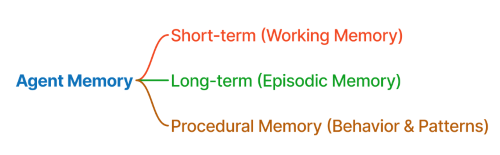
Short-term memory:
-
Current conversation context
-
Lasts for a single session
-
Stored in the state dictionary
-
Used for maintaining coherence within a task
Long-term memory:
-
Persistent information across sessions
-
User preferences, learned facts, configuration
-
Stored in databases or vector stores
-
Requires explicit saving and loading
Episodic memory:
-
Past successful/failed strategies
-
Patterns of what works in specific situations
-
Used for learning and improvement
-
Stored as embeddings of past interactions
Common state management failures:
-
Unbounded state growth causing memory issues
-
Not trimming history leading to token limit errors
-
Missing metadata making debugging impossible
-
No persistent storage losing context between sessions
Termination Check - Knowing When to Stop
Purpose: Determine if the agent should continue or finish
def is_task_complete(state: dict) -> bool: """ Multiple termination conditions for safety and correctness. Never rely on a single condition. """ # Success: Explicit completion if state.get("completed"): return True # Safety: Maximum iterations if state["iteration"] >= MAX_ITERATIONS: logger.warning("Max iterations reached") return True # Safety: Cost limits if calculate_cost(state) >= MAX_COST: logger.warning("Cost budget exceeded") return True # Safety: Time limits if time_elapsed(state) >= MAX_TIME: logger.warning("Time limit exceeded") return True # Detection: Loop/stuck state if detect_loop(state): logger.warning("Loop detected") return True return FalseTermination is critical and complex. A single condition isn't enough. You need multiple safety valves.
Termination conditions explained:
-
Task completion (success): The agent explicitly generated a final answer and marked itself complete. This is the happy path.
-
Max iterations (safety): After N iterations, stop regardless. Prevents infinite loops from logic errors or unclear tasks. Set this based on task complexity - simple tasks might need 5 iterations, complex ones might need 20.
-
Cost limits (budget): Each LLM call costs money. Set a budget (in dollars or tokens) and stop when exceeded. Protects against runaway costs.
-
Time limits (performance): User-facing agents need responsiveness. If execution exceeds time budget, return partial results rather than making users wait indefinitely.
-
Loop detection (stuck states): If the agent repeats the same action multiple times or cycles through the same states, it's stuck. Detect this and terminate.
Loop detection implementation:
def detect_loop(state: dict, window=3) -> bool: """ Detect if agent is repeating actions. Compares last N actions for similarity. """ if len(state["conversation_history"]) < window: return False recent_actions = [ h["action"] for h in state["conversation_history"][-window:] ] # Check if all recent actions are identical if all(a == recent_actions[0] for a in recent_actions): return True # Check if cycling through same set of actions if len(set(str(a) for a in recent_actions)) < window / 2: return True return FalseGraceful degradation:
When terminating due to safety conditions, provide useful output:
def extract_final_answer(state: dict) -> str: """ Extract final answer, handling different termination reasons. """ if state.get("final_answer"): return state["final_answer"] # Terminated due to safety condition if state["iteration"] >= MAX_ITERATIONS: return "Could not complete task within iteration limit. " + \ summarize_progress(state) if detect_loop(state): return "Task appears stuck. Last attempted: " + \ describe_last_action(state) # Fallback return "Task incomplete. Progress: " + summarize_progress(state)Common termination failures:
-
Single termination condition causing infinite loops
-
No cost limits burning through API budgets
-
Missing timeout making user-facing agents unresponsive
-
Poor loop detection allowing stuck states to continue
Tool Calling: The Action Interface
Tools are how agents interact with the world. Without properly designed tools, agents are just chatbots. With them, agents can query databases, call APIs, perform calculations, and manipulate systems.
The three-part tool structure:
Every production tool needs three components:
1. Function Implementation:
def search_web(query: str, num_results: int = 5) -> str: """ Search the web and return results. Args: query: Search query string num_results: Number of results to return (default: 5) Returns: Formatted search results """ try: # Implementation results = web_search_api.search(query, num_results) return format_results(results) except Exception as e: return f"Search failed: {str(e)}"2. Schema Definition:
search_tool_schema = { "name": "search_web", "description": "Search the web for current information. Use this when you need recent data, news, or information not in your training data.", "parameters": { "type": "object", "properties": { "query": { "type": "string", "description": "The search query" }, "num_results": { "type": "integer", "description": "Number of results (1-10)", "default": 5 } }, "required": ["query"] }}3. Wrapper Class:
class Tool: """Base tool interface""" def __init__(self, name: str, description: str, function: callable, schema: dict): self.name = name self.description = description self.function = function self.schema = schema def execute(self, **kwargs) -> dict: """Execute tool with validation and error handling""" # Validate inputs against schema self._validate_inputs(kwargs) # Execute with error handling try: result = self.function(**kwargs) return {"success": True, "result": result} except Exception as e: return {"success": False, "error": str(e)} def _validate_inputs(self, kwargs: dict): """Validate inputs match schema""" required = self.schema["parameters"].get("required", []) for param in required: if param not in kwargs: raise ValueError(f"Missing required parameter: {param}")Why all three components matter:
-
Function implementation does the actual work. This is where you integrate with external systems.
-
Schema definition tells the LLM how to use the tool. Clear descriptions and parameter documentation are essential. The LLM decides which tool to use based entirely on this information.
-
Wrapper class provides standardization. All tools follow the same interface, simplifying agent logic and error handling.
Tool description best practices:
# Bad description"search_web: Searches the web"# Good description"search_web: Search the internet for current information, news, and recent events. Use this when you need information published after your knowledge cutoff or want to verify current facts. Returns the top search results with titles and snippets."Good descriptions answer:
-
What does it do?
-
When should you use it?
-
What does it return?
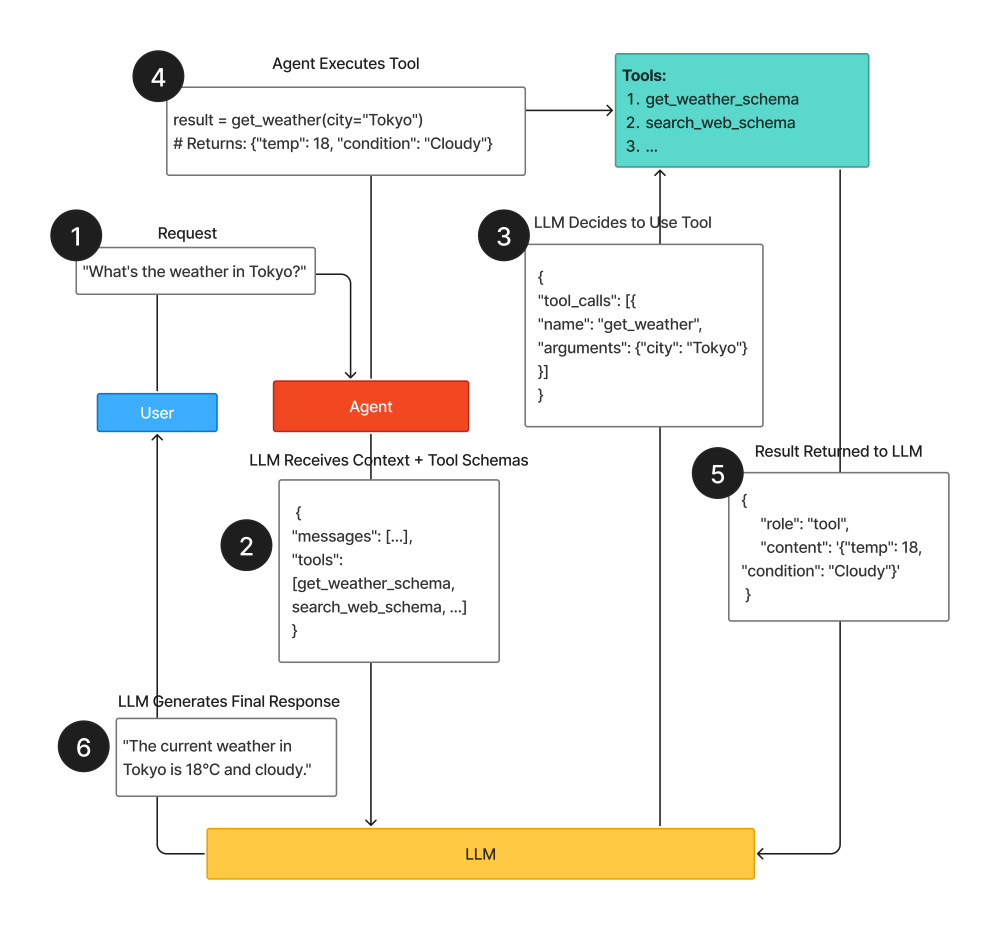
Real-world tool examples:
Calculator tool:
def calculator(expression: str) -> str: """ Evaluate mathematical expressions safely. Supports: +, -, *, /, **, (), and common functions. """ try: # Safe evaluation without exec/eval from ast import literal_eval result = eval_expression_safe(expression) return f"Result: {result}" except Exception as e: return f"Error: {str(e)}"calculator_schema = { "name": "calculator", "description": """Perform mathematical calculations. Supports arithmetic, exponents, and parentheses. Use for any computation.""" , "parameters": { "type": "object", "properties": { "expression": { "type": "string", "description": "Mathematical expression (e.g., '2 + 2', '(10 * 5) / 2')" } }, "required": ["expression"] }}Database query tool:
def query_database(query: str, table: str) -> str: """ Execute SQL query on specified table. Supports: SELECT statements only (read-only). """ # Validate query is SELECT only if not query.strip().upper().startswith("SELECT"): return "Error: Only SELECT queries allowed" try: results = db.execute(query, table) return format_db_results(results) except Exception as e: return f"Query error: {str(e)}"database_schema = { "name": "query_database", "description": """Query the database for stored information. Use this to retrieve user data, preferences, past orders, or historical records. Read-only access.""" , "parameters": { "type": "object", "properties": { "query": { "type": "string", "description": "SQL SELECT query" }, "table": { "type": "string", "description": "Table name to query", "enum": ["users", "orders", "products", "preferences"] } }, "required": ["query", "table"] }}API call tool:
def api_call(endpoint: str, method: str = "GET", data: dict = None) -> str: """ Make API requests to external services. Handles authentication and error responses. """ try: response = requests.request( method=method, url=f"{API_BASE_URL}/{endpoint}", json=data, headers={"Authorization": f"Bearer {API_KEY}"}, timeout=30 ) response.raise_for_status() return response.json() except requests.Timeout: return "Error: Request timeout" except requests.RequestException as e: return f"Error: {str(e)}"api_call_schema = { "name": "api_call", "description": """Call external APIs for real-time data. Use for weather, stock prices, exchange rates, or other external services."" , "parameters": { "type": "object", "properties": { "endpoint": { "type": "string", "description": "API endpoint path (e.g., 'weather', 'stocks/AAPL')" }, "method": { "type": "string", "enum": ["GET", "POST"], "default": "GET" }, "data": { "type": "object", "description": "Request body for POST requests" } }, "required": ["endpoint"] }}Tool error handling patterns:
class ToolExecutionError(Exception): """Base exception for tool errors""" passclass ToolTimeoutError(ToolExecutionError): """Tool execution exceeded timeout""" passclass ToolValidationError(ToolExecutionError): """Tool inputs failed validation""" passdef execute_tool_safe(tool: Tool, arguments: dict) -> dict: """ Production-grade tool execution with comprehensive error handling. """ try: # Validate inputs tool._validate_inputs(arguments) # Execute with timeout with timeout(30): result = tool.execute(**arguments) # Validate output validate_tool_output(result) return result except ToolValidationError as e: logger.error(f"Tool validation failed: {e}") return { "success": False, "error": f"Invalid input: {str(e)}", "recoverable": True } except ToolTimeoutError: logger.error(f"Tool timeout: {tool.name}") return { "success": False, "error": "Tool execution timeout", "recoverable": True } except Exception as e: logger.exception(f"Tool error: {tool.name}") return { "success": False, "error": f"Execution failed: {str(e)}", "recoverable": False }Common tool implementation mistakes:
-
Vague descriptions causing the LLM to misuse tools
-
Missing input validation allowing invalid data through
-
No timeout handling causing hung executions
-
Poor error messages making debugging impossible
-
Inconsistent return formats breaking state updates
Memory Architecture: Short-term, Long-term, and Episodic
Memory separates toy demos from production systems. Conversation without memory frustrates users. But not all memory is the same - different types serve different purposes.
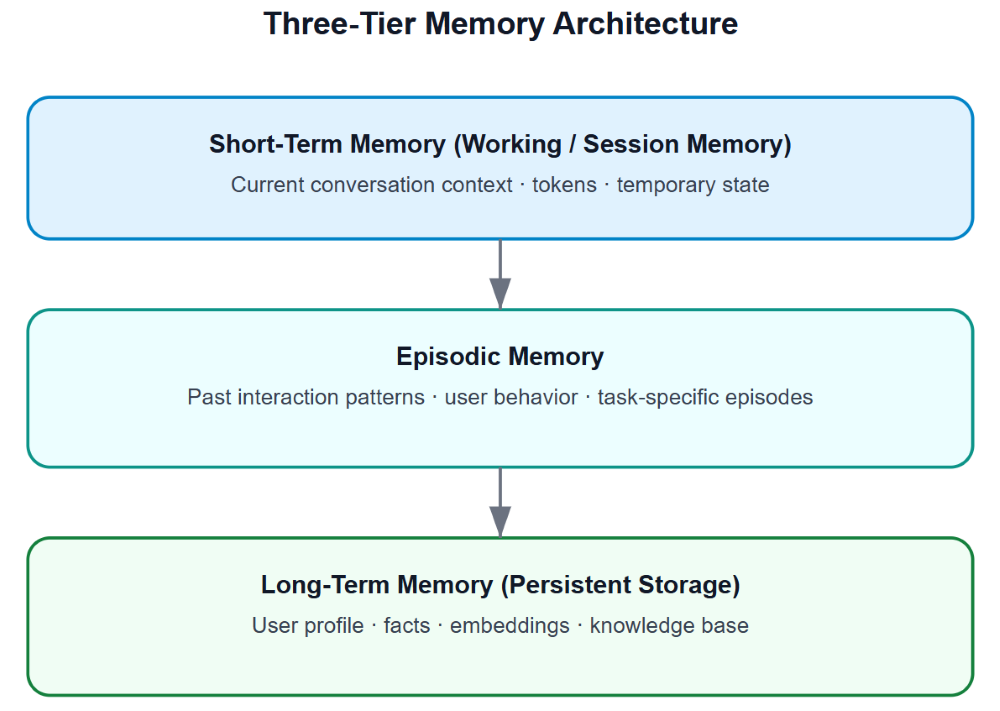
Short-term Memory: Conversation Context
Purpose: Maintain coherence within a single conversation
Implementation:
class ShortTermMemory: """ Manages conversation context for current session. Stored in-memory, not persisted. """ def __init__(self, max_messages: int = 20): self.messages = [] self.max_messages = max_messages def add_message(self, role: str, content: str): """Add message to history""" self.messages.append({ "role": role, "content": content, "timestamp": datetime.now() }) # Trim if too long if len(self.messages) > self.max_messages: self.messages = self.messages[-self.max_messages:] def get_context(self) -> list: """Get recent conversation context""" return self.messages def clear(self): """Clear conversation history""" self.messages = []Use cases:
-
Current conversation flow
-
Immediate context for next response
-
Temporary task state
-
Within-session coherence
Limitations:
-
Lost when session ends
-
Grows unbounded without trimming
-
Token limits force summarization
Long-term Memory: Persistent Storage
Purpose: Remember information across sessions
Implementation:
class LongTermMemory: """ Persistent storage for facts and preferences. Uses database or key-value store. """ def __init__(self, user_id: str, db_connection): self.user_id = user_id self.db = db_connection def store_fact(self, key: str, value: str, category: str = "general"): """Store a fact about the user""" self.db.upsert( table="user_facts", data={ "user_id": self.user_id, "key": key, "value": value, "category": category, "updated_at": datetime.now() } ) def retrieve_fact(self, key: str) -> str: """Retrieve a stored fact""" result = self.db.query( f"SELECT value FROM user_facts WHERE user_id = ? AND key = ?", (self.user_id, key) ) return result["value"] if result else None def get_all_facts(self, category: str = None) -> dict: """Get all facts, optionally filtered by category""" query = "SELECT key, value FROM user_facts WHERE user_id = ?" params = [self.user_id] if category: query += " AND category = ?" params.append(category) results = self.db.query(query, params) return {r["key"]: r["value"] for r in results}Use cases:
-
User preferences (communication style, format preferences)
-
Personal information (name, location, job title)
-
Learned facts (favorite tools, common tasks)
-
Configuration (default parameters, enabled features)
Storage considerations:
Database: Structured facts work well in relational databases
# SchemaCREATE TABLE user_facts ( user_id TEXT, key TEXT, value TEXT, category TEXT, updated_at TIMESTAMP, PRIMARY KEY (user_id, key));Vector database: Semantic retrieval for unstructured information
class VectorMemory: """Store and retrieve memories by semantic similarity""" def __init__(self, user_id: str, vector_db): self.user_id = user_id self.vector_db = vector_db def store(self, content: str, metadata: dict = None): """Store content with embeddings""" embedding = generate_embedding(content) self.vector_db.upsert( user_id=self.user_id, embedding=embedding, content=content, metadata=metadata or {} ) def search(self, query: str, top_k: int = 5) -> list: """Find similar memories""" query_embedding = generate_embedding(query) return self.vector_db.search( user_id=self.user_id, embedding=query_embedding, top_k=top_k )Episodic Memory: Learning from Past Interactions
Purpose: Remember and learn from past episodes (complete task sequences)
Implementation:
class EpisodicMemory: """ Stores complete interaction episodes for learning. Captures successful strategies and failure patterns. """ def __init__(self, user_id: str, vector_db): self.user_id = user_id self.vector_db = vector_db def store_episode(self, task: str, actions: list, outcome: dict): """Store a complete task episode""" episode = { "task": task, "actions": actions, "outcome": outcome, "success": outcome.get("success", False), "timestamp": datetime.now() } # Create embeddings for semantic search episode_text = f"{task} | {format_actions(actions)}" embedding = generate_embedding(episode_text) self.vector_db.upsert( collection="episodes", user_id=self.user_id, embedding=embedding, data=episode ) def retrieve_similar_episodes(self, task: str, top_k: int = 3) -> list: """Find similar past episodes""" query_embedding = generate_embedding(task) return self.vector_db.search( collection="episodes", user_id=self.user_id, embedding=query_embedding, top_k=top_k ) def get_successful_strategies(self, task_type: str) -> list: """Get successful strategies for similar tasks""" episodes = self.retrieve_similar_episodes(task_type, top_k=10) successful = [e for e in episodes if e["success"]] return [e["actions"] for e in successful]Use cases:
-
Learning which approaches work for specific task types
-
Avoiding previously failed strategies
-
Transferring successful patterns to similar tasks
-
Building user-specific behavior models
Episode structure:
episode = { "task": "Find weather in San Francisco", "actions": [ { "type": "tool_call", "tool": "weather_api", "arguments": {"city": "San Francisco"}, "result": {"success": True, "temp": 68} } ], "outcome": { "success": True, "user_satisfied": True, "execution_time": 1.2 }, "metadata": { "context": "user planning trip", "tools_available": ["weather_api", "search_web"], "strategy": "direct_api_call" }}Hybrid Memory System
Production systems combine all three types:
class HybridMemory: """ Complete memory system combining short-term, long-term, and episodic. """ def __init__(self, user_id: str): self.short_term = ShortTermMemory() self.long_term = LongTermMemory(user_id, get_db()) self.episodic = EpisodicMemory(user_id, get_vector_db()) def prepare_context(self, task: str) -> dict: """Prepare complete context for agent""" return { # Current conversation "recent_messages": self.short_term.get_context(), # User facts and preferences "user_facts": self.long_term.get_all_facts(), # Similar past successes "similar_episodes": self.episodic.retrieve_similar_episodes(task), # Learned strategies "successful_strategies": self.episodic.get_successful_strategies(task) } def update(self, role: str, content: str, metadata: dict = None): """Update all memory types""" # Update short-term self.short_term.add_message(role, content) # Extract and store facts if facts := extract_facts(content): for key, value in facts.items(): self.long_term.store_fact(key, value) def finalize_episode(self, task: str, outcome: dict): """Store complete episode after task completion""" actions = self.short_term.get_context() self.episodic.store_episode(task, actions, outcome)Memory selection guide:
| Need | Memory Type |
|---|---|
| Current conversation | Short-term |
| User preferences | Long-term |
| Past successful strategies | Episodic |
| Temporary task state | Short-term |
| Learned behaviors | Long-term + Episodic |
| Session-specific context | Short-term |
| Cross-session facts | Long-term |
| Strategy learning | Episodic |
Observations vs Actions: The Critical Distinction
This seems obvious until you're debugging a broken agent. Did it fail because it didn't observe the right information, or because it took the wrong action based on correct observations?
The distinction:
Observations are information inputs:
-
Current task description
-
Conversation history
-
Available tools
-
Previous results
-
Memory context
-
System state
Actions are operations:
-
Tool calls
-
Final answer generation
-
Follow-up questions
-
State updates
-
Memory writes
Why this matters for debugging:
# Example debugging scenariotask = "Find weather in San Francisco and convert temperature to Celsius"# Agent fails - but where?# Possibility 1: Observation failure# - Task not in context# - Tool description missing# - Previous result not included# Possibility 2: Action failure# - Selected wrong tool# - Provided invalid arguments# - Didn't chain actions properlySystematic debugging approach:
1. Check observations:
def debug_observations(state: dict): """Verify observation quality""" observation = observe(state) checks = { "task_present": "task" in observation, "tools_described": len(observation.get("available_tools", [])) > 0, "history_included": len(observation.get("history", [])) > 0, "previous_result": "previous_result" in observation } print("Observation Quality:") for check, passed in checks.items(): status = "✓" if passed else "✗" print(f" {status} {check}") return observation2. Check reasoning:
def debug_reasoning(observation: dict, reasoning: str): """Verify reasoning quality""" checks = { "task_referenced": observation["task"] in reasoning, "tools_considered": any(tool["name"] in reasoning for tool in observation["available_tools"]), "explicit_decision": any(marker in reasoning for marker in ["I will", "I should", "Next step"]), "reasoning_present": len(reasoning) > 100 } print("Reasoning Quality:") for check, passed in checks.items(): status = "✓" if passed else "✗" print(f" {status} {check}")3. Check actions:
def debug_action(action: dict): """Verify action validity""" checks = { "valid_type": action["type"] in ["tool_call", "final_answer"], "tool_exists": action.get("tool") in get_available_tools(), "has_arguments": "arguments" in action if action["type"] == "tool_call" else True, "arguments_valid": validate_arguments(action) if action["type"] == "tool_call" else True } print("Action Quality:") for check, passed in checks.items(): status = "✓" if passed else "✗" print(f" {status} {check}")Common failure patterns:
Observation failures:
-
Missing tool descriptions → Agent doesn't know what's available
-
Truncated history → Lost context from earlier conversation
-
No previous result → Repeats failed actions
-
Task not included → Goal drift
Reasoning failures:
-
Generic thinking → No specific strategy
-
Ignores tools → Tries to answer without external data
-
No step-by-step breakdown → Jumps to conclusions
-
Contradictory logic → Internal inconsistency
Action failures:
-
Hallucinated tools → Tries to call non-existent functions
-
Invalid arguments → Wrong types or missing required parameters
-
Wrong tool selection → Has right tools but picks wrong one
-
No action → Gets stuck in analysis paralysis
The debugging workflow:
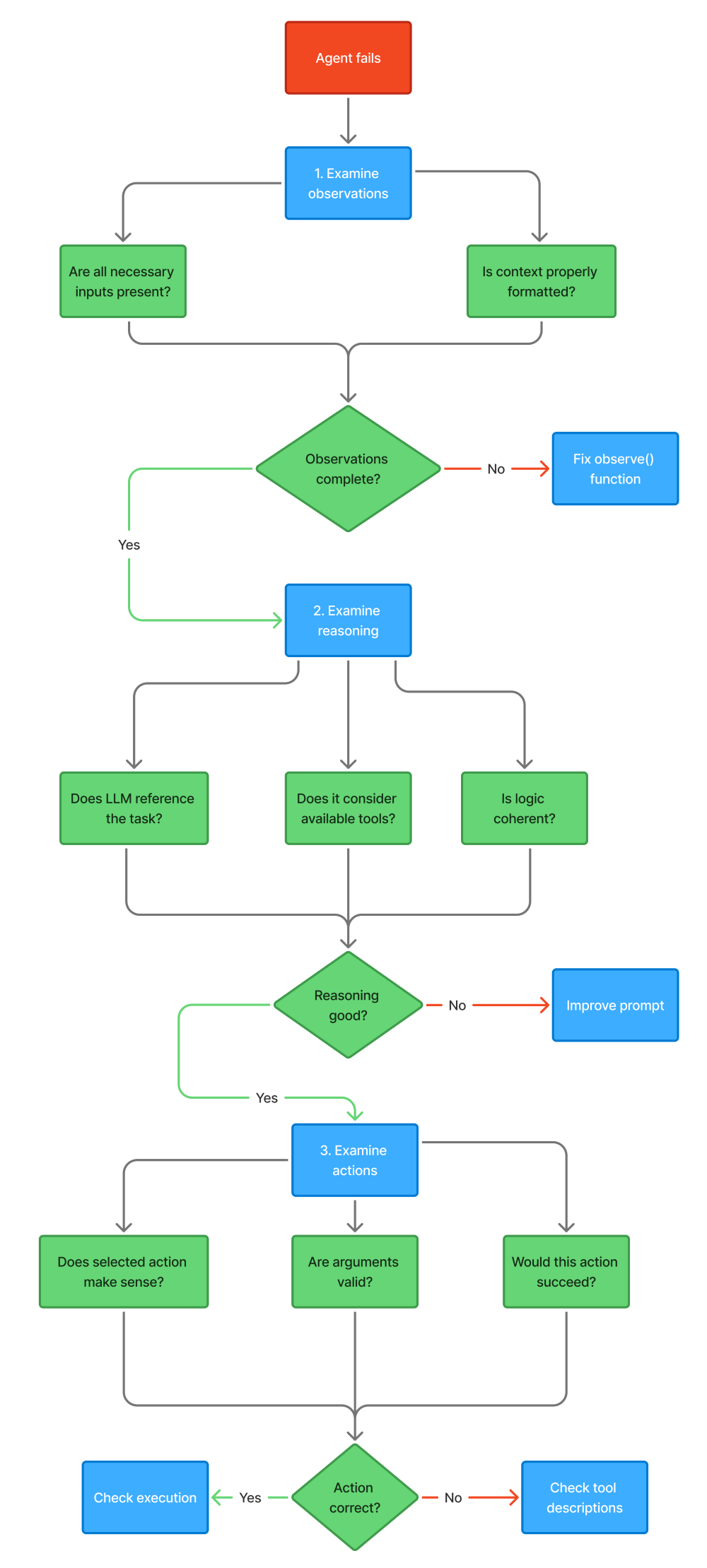
Building a Production Agent: Complete Implementation
Let's tie everything together with a complete, production-ready agent implementation:
import loggingfrom datetime import datetimefrom typing import Dict, List, Anyimport json# Configure logginglogging.basicConfig(level=logging.INFO)logger = logging.getLogger(__name__)class ProductionAgent: """ Complete agent implementation with: - Multiple tools - Conversation memory - Error handling - Execution tracking - Debug capabilities """ def __init__( self, llm, tools: List[Tool], max_iterations: int = 10, max_cost: float = 1.0 ): self.llm = llm self.tools = {tool.name: tool for tool in tools} self.max_iterations = max_iterations self.max_cost = max_cost self.memory = ShortTermMemory() # Execution tracking self.stats = { "total_iterations": 0, "successful_completions": 0, "tool_calls": 0, "errors": 0, "total_cost": 0.0 } def run(self, task: str, debug: bool = False) -> Dict[str, Any]: """ Execute agent loop for given task. Args: task: The task to accomplish debug: Enable debug output Returns: Result dictionary with answer and metadata """ # Initialize state state = { "task": task, "iteration": 0, "completed": False, "start_time": datetime.now() } logger.info(f"Starting task: {task}") try: # Main agent loop while not self._should_terminate(state): if debug: print(f"\n=== Iteration {state['iteration']} ===") # OBSERVE observation = self._observe(state) if debug: print(f"Observation: {json.dumps(observation, indent=2)}") # THINK reasoning = self._think(observation) if debug: print(f"Reasoning: {reasoning[:200]}...") # DECIDE action = self._decide(reasoning) if debug: print(f"Action: {action}") # ACT result = self._act(action) if debug: print(f"Result: {result}") # UPDATE STATE state = self._update_state(state, action, result) # Check completion if result.get("final"): state["completed"] = True state["final_answer"] = result["result"] state["iteration"] += 1 self.stats["total_iterations"] += 1 # Extract final answer answer = self._extract_answer(state) if state["completed"]: self.stats["successful_completions"] += 1 return { "success": True, "answer": answer, "iterations": state["iteration"], "execution_time": (datetime.now() - state["start_time"]).total_seconds(), "termination_reason": self._get_termination_reason(state) } except Exception as e: logger.exception("Agent execution failed") self.stats["errors"] += 1 return { "success": False, "error": str(e), "iterations": state["iteration"] } def _observe(self, state: dict) -> dict: """Gather context for decision making""" return { "task": state["task"], "conversation": self.memory.get_context(), "available_tools": [ { "name": tool.name, "description": tool.description, "parameters": tool.schema["parameters"] } for tool in self.tools.values() ], "iteration": state["iteration"], "max_iterations": self.max_iterations, "previous_result": state.get("last_result") } def _think(self, observation: dict) -> str: """LLM reasoning step""" prompt = self._build_prompt(observation) # Track cost response = self.llm.generate(prompt) self.stats["total_cost"] += estimate_cost(response) return response def _build_prompt(self, observation: dict) -> str: """Construct prompt for LLM""" tools_desc = "\n".join([ f"- {t['name']}: {t['description']}" for t in observation["available_tools"] ]) history = "\n".join([ f"{msg['role']}: {msg['content']}" for msg in observation["conversation"][-5:] ]) return f"""You are a helpful agent that can use tools to accomplish tasks.Task: {observation['task']}Available tools:{tools_desc}Conversation history:{history}Previous result: {observation.get('previous_result', 'None')}You are on iteration {observation['iteration']} of {observation['max_iterations']}.Think step by step:1. What is the current situation?2. What information do I have?3. What information do I need?4. Should I use a tool or provide a final answer?If using a tool, respond with:Tool: <tool_name>Arguments: <arguments_as_json>If providing final answer, respond with:Final Answer: <your_answer>Your reasoning:""" def _decide(self, reasoning: str) -> dict: """Parse reasoning into structured action""" try: if "Tool:" in reasoning: # Extract tool call tool_line = [l for l in reasoning.split("\n") if l.startswith("Tool:")][0] tool_name = tool_line.split("Tool:")[1].strip() args_line = [l for l in reasoning.split("\n") if l.startswith("Arguments:")][0] args_json = args_line.split("Arguments:")[1].strip() arguments = json.loads(args_json) return { "type": "tool_call", "tool": tool_name, "arguments": arguments } elif "Final Answer:" in reasoning: # Extract final answer answer = reasoning.split("Final Answer:")[1].strip() return { "type": "final_answer", "content": answer } else: return { "type": "continue", "message": "No clear action determined" } except Exception as e: logger.error(f"Failed to parse action: {e}") return { "type": "error", "message": f"Could not parse action: {str(e)}" } def _act(self, action: dict) -> dict: """Execute action""" try: if action["type"] == "tool_call": # Validate tool exists if action["tool"] not in self.tools: return { "success": False, "error": f"Tool '{action['tool']}' not found" } # Execute tool tool = self.tools[action["tool"]] result = tool.execute(**action["arguments"]) self.stats["tool_calls"] += 1 return result elif action["type"] == "final_answer": return { "success": True, "result": action["content"], "final": True } elif action["type"] == "continue": return { "success": False, "error": "No action taken - agent is uncertain" } elif action["type"] == "error": return { "success": False, "error": action["message"] } except Exception as e: logger.exception("Action execution failed") return { "success": False, "error": str(e) } def _update_state(self, state: dict, action: dict, result: dict) -> dict: """Update state with action outcome""" # Add to memory self.memory.add_message( role="assistant", content=f"Action: {action['type']} | Result: {result.get('result', result.get('error'))}" ) # Store last result state["last_result"] = result return state def _should_terminate(self, state: dict) -> bool: """Check termination conditions""" # Success if state.get("completed"): return True # Max iterations if state["iteration"] >= self.max_iterations: logger.warning("Max iterations reached") return True # Cost limit if self.stats["total_cost"] >= self.max_cost: logger.warning("Cost limit exceeded") return True # Time limit (5 minutes) elapsed = (datetime.now() - state["start_time"]).total_seconds() if elapsed > 300: logger.warning("Time limit exceeded") return True return False def _extract_answer(self, state: dict) -> str: """Extract final answer from state""" if "final_answer" in state: return state["final_answer"] # Fallback for incomplete tasks last_result = state.get("last_result", {}) if last_result.get("success"): return f"Task incomplete. Last result: {last_result['result']}" else: return f"Task incomplete. Last error: {last_result.get('error', 'Unknown')}" def _get_termination_reason(self, state: dict) -> str: """Determine why execution terminated""" if state.get("completed"): return "task_completed" elif state["iteration"] >= self.max_iterations: return "max_iterations" elif self.stats["total_cost"] >= self.max_cost: return "cost_limit" else: return "unknown" def get_stats(self) -> dict: """Get execution statistics""" return self.stats.copy() def reset_stats(self): """Reset execution statistics""" for key in self.stats: self.stats[key] = 0 if isinstance(self.stats[key], (int, float)) else 0.0Usage example:
# Define toolscalculator = Tool( name="calculator", description="Perform mathematical calculations", function=calculator_function, schema=calculator_schema)weather = Tool( name="weather", description="Get current weather for a location", function=weather_function, schema=weather_schema)search = Tool( name="search_web", description="Search the web for information", function=search_function, schema=search_schema)# Create agentagent = ProductionAgent( llm=get_llm(), tools=[calculator, weather, search], max_iterations=10, max_cost=0.50)# Run taskresult = agent.run( task="What's the weather in San Francisco? Convert the temperature to Celsius.", debug=True)print(f"Answer: {result['answer']}")print(f"Iterations: {result['iterations']}")print(f"Time: {result['execution_time']:.2f}s")print(f"Reason: {result['termination_reason']}")# Check statsprint("\nExecution Statistics:")print(json.dumps(agent.get_stats(), indent=2))This implementation includes:
-
✅ Complete agent loop
-
✅ Multiple tools with validation
-
✅ Conversation memory
-
✅ Error handling at every step
-
✅ Execution tracking and statistics
-
✅ Debug mode for development
-
✅ Multiple termination conditions
-
✅ Cost tracking
-
✅ Comprehensive logging
Testing and Debugging Strategies
Production agents require systematic testing. Here's how to validate each component:
Unit Tests
Test individual functions:
def test_observation(): """Test observation gathering""" state = { "task": "Test task", "conversation_history": [ {"role": "user", "content": "Hello"} ], "iteration": 1 } observation = observe(state) assert "task" in observation assert observation["task"] == "Test task" assert len(observation["history"]) == 1 assert "available_tools" in observationdef test_tool_execution(): """Test tool execution""" tool = calculator_tool result = tool.execute(expression="2 + 2") assert result["success"] == True assert "4" in result["result"]def test_memory(): """Test memory operations""" memory = ShortTermMemory() memory.add_message("user", "My name is Alice") context = memory.get_context() assert len(context) == 1 assert "Alice" in str(context)Integration Tests
Test component interactions:
def test_agent_with_calculator(): """Test agent executing calculator tool""" agent = ProductionAgent( llm=get_test_llm(), tools=[calculator_tool], max_iterations=5 ) result = agent.run("What is 15 * 23?") assert result["success"] == True assert "345" in result["answer"] assert result["iterations"] <= 3def test_agent_multi_step(): """Test multi-step reasoning""" agent = ProductionAgent( llm=get_test_llm(), tools=[calculator_tool, weather_tool], max_iterations=10 ) result = agent.run( "Get weather in Boston. If temperature is above 20C, calculate 20 * 3." ) assert result["success"] == True stats = agent.get_stats() assert stats["tool_calls"] >= 2 # Weather + calculatorEnd-to-End Tests
Test complete user flows:
def test_conversation_memory(): """Test memory across multiple turns""" agent = ProductionAgent( llm=get_test_llm(), tools=[], max_iterations=5 ) # First turn result1 = agent.run("My name is Alice") assert result1["success"] == True # Second turn - should remember name result2 = agent.run("What's my name?") assert result2["success"] == True assert "Alice" in result2["answer"]def test_error_recovery(): """Test agent handling tool errors""" faulty_tool = Tool( name="faulty", description="A tool that fails", function=lambda x: raise_exception(), schema={"parameters": {"properties": {}}} ) agent = ProductionAgent( llm=get_test_llm(), tools=[faulty_tool, calculator_tool], max_iterations=10 ) result = agent.run("Try the faulty tool, then calculate 2+2") assert result["success"] == True # Should recover and complete assert "4" in result["answer"]Performance Tests
Test under load and edge cases:
def test_max_iterations(): """Test iteration limit enforcement""" agent = ProductionAgent( llm=get_test_llm(), tools=[], max_iterations=3 ) result = agent.run("Keep thinking forever") assert result["iterations"] == 3 assert result["termination_reason"] == "max_iterations"def test_cost_limit(): """Test cost limit enforcement""" agent = ProductionAgent( llm=get_expensive_test_llm(), tools=[], max_iterations=100, max_cost=0.01 ) result = agent.run("Complex task") assert result["termination_reason"] == "cost_limit" assert agent.get_stats()["total_cost"] <= 0.01def test_concurrent_execution(): """Test multiple agents running simultaneously""" agent1 = ProductionAgent(llm=get_test_llm(), tools=[calculator_tool]) agent2 = ProductionAgent(llm=get_test_llm(), tools=[weather_tool]) with ThreadPoolExecutor(max_workers=2) as executor: future1 = executor.submit(agent1.run, "Calculate 5 * 5") future2 = executor.submit(agent2.run, "Weather in NYC") result1 = future1.result() result2 = future2.result() assert result1["success"] == True assert result2["success"] == TrueCommon Pitfalls and Solutions
Pitfall 1: Infinite loops
Problem: Agent repeats same action indefinitely
Solution:
def detect_loop(state: dict, window: int = 3) -> bool: """Detect repeated actions""" if len(state["history"]) < window: return False recent = state["history"][-window:] actions = [h["action"] for h in recent] # All identical if all(a == actions[0] for a in actions): return True return FalsePitfall 2: Context window overflow
Problem: Too much history exceeds token limits
Solution:
def manage_context(history: list, max_tokens: int = 4000) -> list: """Keep context within token limits""" while estimate_tokens(history) > max_tokens: if len(history) <= 2: # Keep minimum context break # Remove oldest message history = history[1:] return historyPitfall 3: Tool hallucination
Problem: LLM invents non-existent tools
Solution:
def validate_tool_call(tool_name: str, available_tools: list) -> bool: """Validate tool exists before execution""" if tool_name not in [t.name for t in available_tools]: logger.warning(f"Attempted to call non-existent tool: {tool_name}") return False return TruePitfall 4: Poor error messages
Problem: Generic errors make debugging impossible
Solution:
class ToolError(Exception): """Rich error with context""" def __init__(self, tool_name: str, error: str, context: dict): self.tool_name = tool_name self.error = error self.context = context super().__init__(f"Tool '{tool_name}' failed: {error}")Production Deployment Checklist
Before deploying agents to production:
Code Quality:
-
[ ] All functions have type hints
-
[ ] Comprehensive error handling
-
[ ] Logging at appropriate levels
-
[ ] Unit tests for all components
-
[ ] Integration tests for workflows
-
[ ] Code review completed
Performance:
-
[ ] Token usage optimized
-
[ ] Cost limits configured
-
[ ] Timeout handling implemented
-
[ ] Concurrent execution tested
-
[ ] Load testing completed
Reliability:
-
[ ] Retry logic for transient failures
-
[ ] Circuit breakers for external services
-
[ ] Graceful degradation strategies
-
[ ] Monitoring and alerting configured
-
[ ] Incident response procedures documented
Security:
-
[ ] Input validation on all tools
-
[ ] SQL injection prevention
-
[ ] API key management
-
[ ] Rate limiting implemented
-
[ ] Audit logging enabled
Observability:
-
[ ] Structured logging
-
[ ] Metrics collection
-
[ ] Distributed tracing
-
[ ] Debug mode for development
-
[ ] Performance profiling
Key Takeaways
The agent loop is fundamental: Every agent implements observe → think → decide → act → update state. Understanding this pattern helps you work with any framework.
Tools enable action: Without properly designed tools, agents are just chatbots. Invest time in clear descriptions, robust schemas, and comprehensive error handling.
Memory separates demos from production: Short-term memory maintains conversations. Long-term memory persists facts. Episodic memory enables learning.
Observations ≠ Actions: When debugging, distinguish between information gathering failures and execution failures. They require different fixes.
Production requires robustness: Max iterations, cost limits, timeouts, error handling, and logging aren't optional - they're essential.
Start simple, add complexity: Build single-loop agents first. Master the basics before moving to multi-agent systems and complex workflows.
What's Next: LangGraph and Deterministic Flows
You now understand agent building blocks. But there's a problem: the loop we built is still somewhat opaque.
Questions remain:
-
How do you guarantee certain steps happen in order?
-
How do you create branches (if-then logic)?
-
How do you make agent behavior deterministic and testable?
-
How do you visualize complex workflows?
The next blog will introduce LangGraph - a framework for building agents as explicit state machines. You'll learn:
-
Why graphs beat loops for complex agents
-
How to define states, nodes, and edges
-
Conditional routing and branching logic
-
Checkpointing and retry mechanisms
-
Building deterministic, debuggable workflows
The key shift: From implicit loops to explicit state graphs
Instead of a while loop where logic is hidden in functions, you'll define explicit graphs showing exactly how the agent moves through states. This makes complex behaviors clear, testable, and debuggable.
Conclusion: From Components to Systems
Building production-ready agents isn't about calling agent.run() and hoping for the best. It's about understanding each component - the execution loop, tool interfaces, memory architecture, and state management - and how they work together.
This guide gave you working implementations of every pattern. You've seen:
-
The canonical agent loop with all five steps
-
Tool design with schemas, validation, and error handling
-
Memory systems for short-term, long-term, and episodic storage
-
The observation-action distinction for systematic debugging
-
A complete production agent with tracking and statistics
The code isn't pseudocode or simplified examples. It's production-grade implementation you can adapt for real systems.
Start building: Take the patterns here and apply them to your problems. Build tools for your APIs. Implement memory for your users. Create agents that handle real tasks reliably.
The fundamentals transfer across frameworks. Whether you use LangChain, LangGraph, or custom solutions, you'll recognize these patterns. More importantly, you'll know how to debug them when they break.
Next up: LangGraph for deterministic, visual workflows. But first, implement the patterns here. Build a single-loop agent. Add tools. Test memory. Experience the challenges firsthand.
That's how you master agent development.
Additional Resources
LangChain Documentation:
Research Papers:
-
ReAct: Synergizing Reasoning and Acting in Language Models (Yao et al., 2023) - The foundational paper on ReAct prompting
-
Toolformer: Language Models Can Teach Themselves to Use Tools (Schick et al., 2023) - How LLMs learn tool usage
Code Repository: Full working code that you can extend: https://github.com/ranjankumar-gh/building-real-world-agentic-ai-systems-with-langgraph-codebase/tree/main/module-02
About This Series
This post is part of Building Real-World Agentic AI Systems with LangGraph, a comprehensive guide to production-ready AI agents. The series covers:
-
Module 2: LLMs & Tool Calling (This Post)
-
Module 4: Planning & Self-Correction
-
Module 5: Multi-Agent Systems
-
And more…
Now go build something real.
Related Articles
- Building Production-Ready AI Agents with LangGraph: A Developer's Guide to Deterministic Workflows
- When Your Chatbot Needs to Actually Do Something: Understanding AI Agents
- LLM-Powered Chatbots: A Practical Guide to User Input Classification and Intent Handling
- Stop Pasting Screenshots: How AI Engineers Document Systems with Mermaid
Follow for more technical deep dives on AI/ML systems, production engineering, and building real-world applications: