This article uses Claude Code's Agent Skills system as the reference implementation - the
SKILL.mdformat,skill-creator, and eval runner are Claude Code-specific. But the problem is universal. Every agentic system suffers from the re-teaching tax: domain expertise lives in per-session prompts, gets forgotten between runs, and produces inconsistent output. The fix - encoding expertise into a versioned, discoverable, testable artifact the agent loads only when relevant - applies to any framework. The Skill Sharpening Loop is a methodology, not a product feature. What you call it in your stack is secondary. That you build it, version it, and iterate on it is what determines whether your agent's expertise compounds or resets to zero on every call.
Your agent gets the task right in testing. It gets it wrong in production - not because the model failed, but because you explained the workflow once, in one session, and it forgot. The next engineer on your team explained it slightly differently, and got slightly different results. The third engineer tried a different phrasing and got something else entirely.
You are re-teaching your agent everything it needs to know about your domain, your conventions, and your workflows, from scratch, on every single call. This is not a prompt engineering problem. It is a knowledge persistence problem. And there is now a solved format for it.
Agent Skills - introduced by Anthropic in October 2025 and now an open standard that runs across Claude Code, OpenAI Codex, GitHub Copilot, and VS Code - are the mechanism for making agent knowledge durable, testable, and portable. A skill is a directory with a SKILL.md file that the agent loads on demand when the task matches. It packages your team's workflows, conventions, and domain expertise into a reusable module the agent discovers automatically.
The thesis here is not that skills are a nice developer experience improvement. The thesis is that skills are the knowledge layer of your agent stack - as foundational to production agent systems as the harness is to tool execution and the control plane is to policy enforcement. Teams that treat them as optional configuration will keep paying the re-teaching tax forever. Teams that build them deliberately will compound their agent quality across every workflow they own.
What Skills Actually Are (and What They Are Not)
Before getting into what skills enable, it is worth being precise about what they are not.
Skills are not prompts. Prompts are conversation-level instructions - one-time guidance assembled per request and discarded after the turn. Skills are persistent, filesystem-based modules that the agent discovers independently and loads only when relevant. The difference is the difference between a sticky note and a documented procedure.
Skills are not MCP servers. MCP gives an agent access - connections to databases, APIs, external services, the tools it can call. Skills give an agent expertise - the procedural knowledge of how to use that access correctly and consistently. A Sentry MCP server gives the agent access to your error data. A code-review skill teaches it exactly how to analyze that data against your team's standards, which fields to prioritize, when to escalate versus when to comment, and what format to write the output in. The access without the expertise produces inconsistent behavior. The expertise without the access is useless. They are complementary layers, not alternatives.
Skills are not CLAUDE.md. The CLAUDE.md file gives project-wide context - repository structure, coding conventions, environment setup - that applies to all tasks in the project. Skills are task-specific and load only when their trigger matches. A skill for writing incident runbooks does not load when the agent is writing a database migration. This is progressive disclosure: the agent carries lightweight metadata about all installed skills at startup, and only loads the full content of a skill when it decides the current task matches.
What skills actually are: encoded expertise that an agent discovers autonomously and loads on demand, making team knowledge durable, consistent, and testable across every agent call.
The Failure Skills Are Solving
The failure mode is subtle enough that most teams don't name it. They experience it as variability: the same task run by different engineers produces different quality results, because each engineer prompts the agent differently. They experience it as drift: the agent's output quality degrades over weeks as the team stops remembering to include the full context. They experience it as maintenance cost: every time your stack changes, you update ten different system prompts instead of one skill.
The underlying problem is that agent expertise lives in engineer heads and per-session prompts, not in durable, versioned artifacts. When the engineer who knew the right phrasing leaves the team, the quality goes with them.
Here is a concrete example. "Verifier skills" - the 2-3x quality multiplier - highest leverage - are scripted end-to-end validation flows. A verifier skill knows exactly how to check whether a PR meets your team's definition of done: which tests must pass, which lint rules are blocking, which documentation fields must be populated, how to format the verification report. Without a verifier skill, the agent does a generic verification that catches generic problems. With the skill, it does your verification, against your standards, in your format, every time.
That consistency is what makes it a quality multiplier. It is not that the agent gets smarter. It is that it stops forgetting how your team works.
The Skill Format: Simple by Design
A skill is a directory. The minimum viable skill is a single file:
linear-sprint-planner/└── SKILL.mdThe SKILL.md file has two parts. First, YAML frontmatter that the agent scans at startup:
---name: linear-sprint-plannerdescription: > Automates Linear sprint planning including cycle creation, backlog triage, and task assignment. Use when user says "plan the sprint", "set up the next cycle", "help me prioritize the backlog", or "create sprint tasks in Linear". Requires Linear MCP server to be connected.metadata: mcp-server: linear version: 1.0.0---Second, the skill body: Markdown instructions describing the workflow, the conventions, the failure modes to avoid, the output format to produce.
The frontmatter is the trigger mechanism. The agent pre-loads skill names and descriptions across all installed skills into its context at startup - this is the first level of progressive disclosure. The name and description for a typical skill consume roughly 50-100 tokens. Fifteen installed skills add 750-1,500 tokens to the context - negligible compared to the alternative of front-loading all skill content. When a user message matches a skill's description, the agent reads the full SKILL.md body from disk via bash. Only then does the detailed content enter the context window.
This architecture solves a real problem from the previous article on context engineering: you cannot front-load domain expertise for every workflow into the system prompt without bloating the context and triggering context rot. Skills give you effectively unbounded domain knowledge - because the knowledge only enters the window when it is relevant. A team with 30 installed skills pays 1,500-3,000 tokens of startup overhead to gain on-demand access to everything those 30 skills contain.
A production skill grows beyond the single file as complexity demands:
incident-runbook/├── SKILL.md # Trigger + core workflow├── scripts/│ └── collect_signals.py # Executable scripts the agent can run├── references/│ └── ESCALATION_POLICY.md # Loaded on demand when needed│ └── SEVERITY_MATRIX.md # Reference docs, not always needed└── assets/ └── runbook-template.md # Output templatesScripts in the scripts/ directory are executable - the agent runs them directly via bash during skill execution. For the incident runbook example, collect_signals.py might pull the last 30 minutes of logs, query your alerting system's API, and write a structured JSON summary to stdout that the agent then interprets. Reference documents in references/ are loaded selectively when the skill's instructions direct the agent to consult them - they do not enter the context window unless explicitly needed. Assets provide templates and static resources. The entire directory is a self-contained, versioned package of expertise that installs as a single artifact.
The Four Skill Types Worth Building
The four highest-leverage skill shapes cluster around a common pattern. These are not arbitrary categories - they reflect the four primary failure modes agents hit when team knowledge isn't encoded.
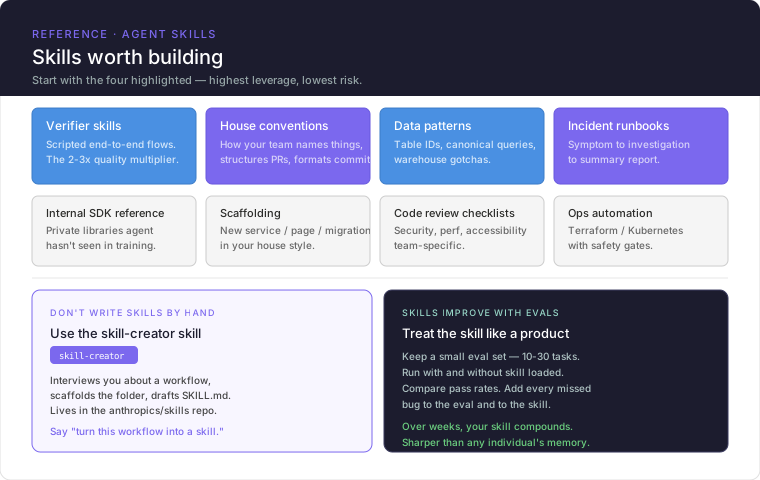
Verifier Skills
What they are: Scripted end-to-end quality gates. The agent follows a defined verification workflow against explicit criteria, rather than inventing its own definition of "done."
Why they are the 2-3x quality multiplier: Without a verifier, different engineers define quality differently, and the agent reflects that inconsistency back at scale. With a verifier, there is one definition of done, consistently applied, that improves every output that passes through it.
What they contain: The specific checks to run in order, the criteria for each check, the escalation thresholds, and the output format for the verification report.
---name: pr-verifierdescription: > Verifies a pull request meets team quality standards before review request. Use when asked to verify, review readiness, check a PR, or validate changes. Do NOT trigger for general code questions or exploratory analysis.---# PR Verification Workflow## Required checks (run in order)### 1. Tests- Run `pytest` and confirm all tests pass- Confirm test coverage has not decreased from main branch baseline- Flag any new files without corresponding test files### 2. Lint- Run `ruff check .` - zero errors required, warnings flagged for author attention- Run `mypy` on changed files - type errors are blocking### 3. Documentation- Every public function or class modified must have a docstring- If a public API changed, confirm CHANGELOG.md was updated### 4. Migration safety (if applicable)- If any database model was modified: confirm migration file exists and is reversible- Check migration does not drop columns without a deprecation period## Output formatReturn a verification report with:- PASS / FAIL verdict (one line, prominent)- Blocking issues (must fix before requesting review)- Advisory items (should fix, not blocking)- Skipped checks and reasonDo not editorialize. Report what you found.House Conventions Skills
What they are: Your team's naming, structure, and formatting standards encoded once so the agent applies them everywhere without being reminded.
The failure mode they prevent: Engineers spend significant time prompting "use our component naming convention" / "follow our PR template" / "write commits in our format" on every relevant call. As new team members join, the conventions get diluted because there is no canonical source the agent learns from.
What they contain: The actual conventions, with examples of correct and incorrect patterns. The more specific, the better.
---name: house-conventionsdescription: > Apply team-specific naming, structure, and formatting standards. Use when creating new files, writing commits, opening PRs, or generating any code that will be committed to this repository. Triggers on "new component", "create a PR", "write a commit", "scaffold", or similar creation requests.---# Team Conventions## Commit formatUse Conventional Commits with our scope list:- `feat(scope): description` for new functionality- `fix(scope): description` for bug fixes- `refactor(scope): description` for restructuring without behavior change- Scopes: `api`, `auth`, `data`, `ui`, `infra`, `docs`, `test`- Max 72 characters in subject line- Body required for breaking changes## Component structureEvery new React component lives in `src/components/{ComponentName}/` and contains:- `index.tsx` - component implementation- `index.test.tsx` - unit tests (required, not optional)- `index.stories.tsx` - Storybook story (required for any visible UI component)## Naming- Components: PascalCase- Hooks: camelCase, prefix `use`- Utilities: camelCase, no prefix- Constants: SCREAMING_SNAKE_CASE- Files mirror the export name exactlyData Patterns Skills
What they are: Your canonical queries, table schemas, warehouse gotchas, and data interpretation conventions. Everything a new analyst would need to know to not make mistakes with your data.
The failure mode they prevent: The agent writes a SQL query against your data warehouse that looks reasonable but violates a known gotcha - a soft-delete pattern not enforced at the database level, a partitioning scheme the planner ignores unless explicitly hinted, a join that fans out without a deduplification step. These are things your senior engineers know. Skills make that knowledge agent-accessible.
What they contain: Canonical query patterns, schema notes, known failure modes, the joins that are always safe versus the ones that need review.
Incident Runbooks
What they are: Structured investigation workflows: symptom maps to investigation path maps to summary report. The agent follows the runbook rather than improvising an investigation.
The failure mode they prevent: An improvising agent produces investigation summaries that are inconsistent in depth, scope, and format. The on-call engineer who reads them cannot quickly extract the same signal each time. A runbook-driven agent always follows the same evidence-gathering sequence, always checks the same upstream dependencies, always produces the same report structure.
What they contain: The symptom-to-investigation-path mapping, the specific signals to collect for each symptom type, the output format for the incident summary.
The Wrong Way: Writing Skills by Hand
Here is the failure mode that needs explicit call out: "Don't write skills by hand."
The problem with writing skills by hand is the same problem with writing tests by hand for code you haven't run: you describe what you think the workflow should be, not what actually makes the agent perform correctly. Your mental model of the workflow and the agent's execution of it diverge. Without evals, you have no signal on where they diverge.
Teams that write skills by hand and never test them discover the failure in production: the skill triggers when it shouldn't, or doesn't trigger when it should, or triggers correctly but the instructions produce inconsistent outputs, or worked with last month's model and doesn't work after the update.
The right approach is to use the skill-creator skill - Anthropic's meta-skill that interviews you about the workflow, scaffolds the directory structure, drafts the SKILL.md, and then runs evals to measure whether the skill actually works. The skill-creator is itself published in the anthropics/skills public repository and is the first skill most teams should install. It is Anthropic's clearest statement about how skills should be built: even the tool for building skills is built as a skill, tested with evals, and iterated with benchmarks. The methodology it uses is the methodology it teaches.
The Right Way: skill-creator + Evals
The skill-creator workflow has four modes. Understanding each mode is what separates a skill that seems to work from a skill you know works.
Create mode - The skill creator interviews you. It asks what the workflow does, when it should trigger and when it shouldn't, what success looks like, and what the edge cases are. From your answers, it scaffolds the folder structure and drafts the SKILL.md. You get a first draft without having to know the format.
Eval mode - The eval is the mechanism that makes skills behave like software instead of like guesses. An eval has three components:
- A prompt - a realistic user message, the kind an engineer would actually type
- Expected output - a human-readable description of what success looks like
- Optional input files - artifacts the skill needs to work with
The eval runner executes the skill against each prompt, grades the output against the expected criteria, and reports pass rates. Critically, it also runs each prompt without the skill loaded to establish a baseline. The metric that matters is the delta: how much better does the agent perform with the skill than without it?
{ "skill_name": "pr-verifier", "evals": [ { "id": 1, "prompt": "Verify this PR is ready for review: [PR link]", "expected": "Report includes PASS/FAIL verdict, lists blocking issues separately from advisory items, covers all four check categories (tests, lint, docs, migrations)" }, { "id": 2, "prompt": "Check if the changes in this branch are good to go", "expected": "Skill triggers on implicit request, produces same structured report format" }, { "id": 3, "prompt": "What does our test coverage look like?", "expected": "Skill does NOT trigger - this is a general question, not a verification request" } ]}Eval 3 is as important as evals 1 and 2. A skill that triggers on everything is worse than no skill - it loads context into the window when it shouldn't and pollutes every call with irrelevant instructions.
Improve mode - The analyzer takes the eval results, identifies patterns in the failures, and suggests targeted changes to the skill description or instructions. This is the iteration loop: improve → re-eval → compare pass rates → repeat.
Benchmark mode - A standardized assessment that tracks pass rate, elapsed time, and token usage across versions and model updates. The benchmark is what you run after Anthropic releases a new model to confirm your skills still work, or to detect that they have become unnecessary because the model now does the task well without them.
The eval framework implements the lifecycle of a skill:
flowchart TD
    A[Interview: what does this workflow do?]:::blue --> B[skill-creator scaffolds SKILL.md]:::teal
    B --> C[Write evals: prompts + expected outputs]:::blue
    C --> D[Run: with-skill vs without-skill]:::purple
    D --> E{Pass rate delta?}:::purple
    E -->|Below threshold| F[Analyzer: identify failure patterns]:::yellow
    F --> G[Improve: targeted SKILL.md changes]:::orange
    G --> D
    E -->|Above threshold| H[Benchmark: track across model updates]:::green
    H --> I{Evals pass without skill?}:::purple
    I -->|Yes| J[Retire: model absorbed the skill]:::grey
    I -->|No| H

    classDef blue fill:#4A90E2,color:#fff,stroke:#3A7BC8
    classDef teal fill:#98D8C8,color:#fff,stroke:#88C8B8
    classDef purple fill:#7B68EE,color:#fff,stroke:#6858DE
    classDef yellow fill:#FFD93D,color:#333,stroke:#EFC92D
    classDef orange fill:#FFA07A,color:#fff,stroke:#EF906A
    classDef green fill:#6BCF7F,color:#fff,stroke:#5BBF6F
    classDef grey fill:#95A5A6,color:#fff,stroke:#859596
The retirement check is one of the underappreciated parts of the eval framework. Some skills are capability uplift skills - they compensate for something the base model can't do reliably today. As models improve, the base model absorbs those capabilities. Evals run without the skill loaded tell you exactly when that has happened. The skill isn't broken; it is obsolete. Retire it and stop paying the context loading cost.
Other skills are encoded preference skills - they document how your team does something, not how the model should do something. Your commit message conventions, your incident report format, your PR template. These don't become obsolete when models improve. They are durable as long as the workflow is durable.
The Skill Sharpening Loop: Knowledge That Compounds
Over weeks, your skill gets measurably sharper than any individual's memory. That's the compounding move.
This is not marketing. It is a description of what happens when you run evals systematically.
An individual's mental model of a workflow drifts. They remember the cases they encountered recently. They forget the edge cases they haven't seen in three months. The system prompt they wrote in January reflects January's understanding of the workflow.
A skill backed by evals compounds in the opposite direction. Each failure surface identified during a real run becomes a test case. Each test case tightens the skill's description or instructions. Each iteration narrows the gap between what the skill promises and what the agent delivers. The skill gets measurably better - not by asking the engineer to remember more, but by encoding what the engineer already knows into a testable artifact.
This is the Skill Sharpening Loop: the flywheel where operational failures become eval cases, eval cases drive skill improvements, and skill improvements prevent the same failures from recurring. Each pass through the loop increases the skill's pass rate and decreases the variance in agent output quality. Teams that run the Skill Sharpening Loop intentionally accumulate a compounding quality advantage over teams that don't. At six months, the gap between a team running systematic evals and a team running none is not marginal - it is the difference between an agent that reliably handles your domain and one that handles it most of the time.
The human gate in that loop is carrying more weight than it looks. Run the same flywheel with the model editing its own harness and nobody curating the result, and only 2 of 64 automated edits beat run-to-run noise - the measurement problem the Skill Sharpening Loop solves by keeping an engineer on the eval, not the edit.
Skills in the Agent Stack
Skills fit into the broader architecture above the harness and below the user interface. If you are building on the Harness Engineering patterns, the skill layer sits between the harness (which controls tool execution and policy enforcement) and the task layer (which executes domain work).
The harness ensures tools are invoked safely and within policy. The skill ensures they are invoked correctly and in the right sequence for the specific workflow. They are complementary layers: the harness is the safety shell; the skill is the expertise shell. The dividing line between the two shells - why skills are advisory, not enforced - is the subject of Part 9.
In a multi-agent system, skills become the shared expertise layer. A front-end subagent and a UI review subagent each load their own specialized skills. But both can load the same accessibility standards skill. The skill is the mechanism by which expertise crosses agent boundaries without duplication.
The connection to context engineering from the previous article is direct: skills are the structured alternative to front-loading all domain knowledge into the system prompt. Instead of a 10,000-token system prompt that contains everything the agent might ever need to know about your domain, you install skills and let the agent discover what it needs at runtime. The context window stays focused. The expertise stays accessible.
Production Checklist: Building Skills That Hold Up
Before shipping any skill to your team:
Description precision
- Does the description specify both when to trigger AND when NOT to trigger?
- Would a stranger reading the description immediately know which tasks it covers?
- Have you tested that the skill triggers on implicit requests (without naming the skill), not just explicit invocations?
Instruction quality
- Does the skill body describe the workflow at the right altitude - specific enough to constrain behavior, flexible enough to handle variation?
- Are there examples of correct output included, not just descriptions of what correct means?
- Are the failure modes documented - what the agent should do when something goes wrong?
Eval coverage
- Do you have at least 10-30 eval cases covering: explicit invocation, implicit invocation, and cases where the skill should NOT trigger?
- Have you measured the with-skill vs without-skill delta? A skill with no measurable delta is not worth the context loading cost.
- Have you run benchmarks before and after a model update?
Maintenance
- Is the skill in version control, tracked like code?
- Is there an owner responsible for running benchmarks when models update?
- For capability uplift skills: is there a scheduled check to test whether the model has absorbed the capability and the skill can be retired?
MCP integration (if applicable)
- Is the required MCP server documented in the skill's frontmatter
metadata? - Does the skill handle gracefully the case where the MCP server is not connected?
- Have you tested the skill with the MCP server connected, not just the skill in isolation?
References
- Anthropic. (October 16, 2025). Equipping agents for the real world with Agent Skills. https://www.anthropic.com/engineering/equipping-agents-for-the-real-world-with-agent-skills
- Anthropic. (December 18, 2025). Introducing Agent Skills. https://www.anthropic.com/news/skills
- Anthropic. (April 2026). Improving skill-creator: Test, measure, and refine Agent Skills. https://claude.com/blog/improving-skill-creator-test-measure-and-refine-agent-skills
- Anthropic. Agent Skills - Claude API Docs. https://platform.claude.com/docs/en/agents-and-tools/agent-skills/overview
- Anthropic. What are Skills? - Claude Help Center. https://support.claude.com/en/articles/12512176-what-are-skills
- agentskills.io. Evaluating skill output quality. https://agentskills.io/skill-creation/evaluating-skills
- Schmid, P. (2025). Practical Guide to Evaluating and Testing Agent Skills. https://www.philschmid.de/testing-skills
- Poudel, B. (February 2026). The SKILL.md Pattern: How to Write AI Agent Skills That Actually Work. Medium. https://bibek-poudel.medium.com/the-skill-md-pattern-how-to-write-ai-agent-skills-that-actually-work-72a3169dd7ee
- Willison, S. (October 16, 2025). Claude Skills are awesome, maybe a bigger deal than MCP. https://simonwillison.net/2025/Oct/16/claude-skills/
- IntuitionLabs. (February 2026). Claude Skills vs. MCP: A Technical Comparison for AI Workflows. https://intuitionlabs.ai/articles/claude-skills-vs-mcp
- OpenAI Developers. (2026). Testing Agent Skills Systematically with Evals. https://developers.openai.com/blog/eval-skills
- Microsoft Learn. (2026). Agent Skills. https://learn.microsoft.com/en-us/agent-framework/agents/skills
- VS Code Documentation. (2026). Use Agent Skills in VS Code. https://code.visualstudio.com/docs/copilot/customization/agent-skills
Related Articles
- Which Claude Code Layer Solves Your Problem? A Diagnostic Guide for AI Engineers
- Claude Code Guide: Build Agentic Workflows with Commands, MCP, and Subagents
- How to Know Your Claude Code Setup Actually Works: Testing Beyond the Skill Level
- Subagents: How to Run Parallelism Inside a Single Agent Session Without Poisoning the Parent


