Updated 27 September 2026: the code examples are updated for current releases. Tool selection now goes through langgraph-bigtool's tool registry. Subagents use LangChain's create_agent pattern, since the langgraph-supervisor package is no longer maintained, and compression calls claude-sonnet-4-6 in place of a retired model. I also removed a token-reduction figure attributed to LangChain: it could not be traced to any source.
Your agent fails in production. You upgrade the model. It still fails. You add more examples to the system prompt. Still fails. You switch to a longer context window. Still fails.
The autopsy is always the same: "The LLM hallucinated." "We need a smarter model." This is wrong. Most agent failures in production are not model failures - they are context failures. The model isn't the problem. What you're feeding it is.
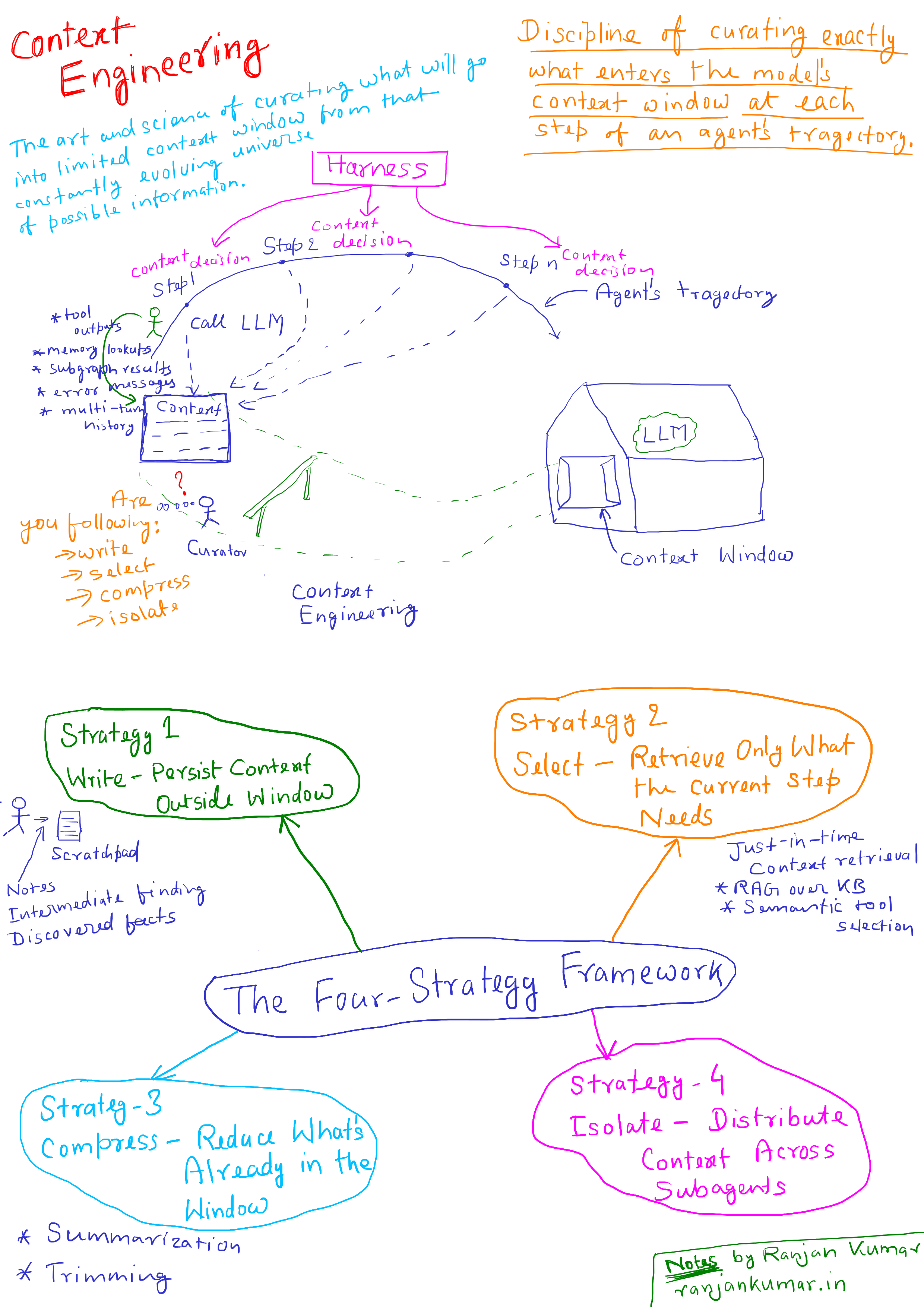
Context engineering is the discipline of curating exactly what enters the model's context window at each step of an agent's trajectory. It is not the same as prompt engineering. It is not about word choice. It is about information architecture - what gets written, what gets retrieved, what gets compressed, and what gets isolated. For production agents, it is the single most leveraged engineering investment you can make, and most teams are not doing it.
This article breaks down the failure modes context engineering solves, the four-strategy framework for implementing it in LangGraph, and the operational patterns that separate agents that stay coherent across hundreds of turns from agents that fall apart at step 12.
Why Prompt Engineering Broke Down When Agents Arrived
For single-turn tasks, prompt engineering worked. You had a system prompt, a user message, and a response. The context was static. The primary variable was phrasing — and on that shape you can still measure which phrasing actually wins.
Agents changed the problem entirely. An agent running in a loop accumulates context with every step: tool outputs, memory lookups, subgraph results, error messages, multi-turn history. The context window becomes a living artifact that grows across time. Writing a better system prompt does nothing to address what happens to that window after step 3.
Andrej Karpathy framed this well: LLMs are like a new kind of operating system, with the context window as RAM. Just like an OS curates what fits into a CPU's working memory, context engineering curates what fits into the model's. The difference between a demo and a production system is largely this: the demo ignores the RAM problem. The production system engineers around it.
Anthropic's engineering team defines context engineering as "the art and science of curating what will go into the limited context window from that constantly evolving universe of possible information." That universe is infinite. The context window is not. Everything that doesn't make that cut - by accident or by design - shapes the agent's behavior.
The Core Problem: Context Has Diminishing Returns
The naive assumption is that more context is better. Feed the agent everything. Let it figure out what's relevant. This assumption is empirically false and expensive to discover in production.
A 2025 Chroma research study tested 18 frontier models - including GPT-4.1, Claude, and Gemini - and found that every single one performed worse as input length grew. The degradation wasn't gradual. Models maintained near-perfect accuracy up to a threshold, then dropped sharply. Some went from 95% to 60% accuracy without warning. This is what researchers call context rot: the degradation of model performance as context length increases, even when the relevant information is technically present in the window.
The mechanism is architectural. The transformer attention mechanism creates n² pairwise relationships across all tokens. As the context grows, the model's attention budget gets stretched thin. Important information buried in the middle - what Stanford researchers documented as the "lost-in-the-middle" problem - gets underweighted relative to information at the start and end of the window. The model technically sees everything. It doesn't reliably use everything.
Three technical failures produce context rot in production agent systems:
Positional bias - Information placement in the window affects how strongly the model attends to it. System prompt content placed 80,000 tokens back gets treated differently than the same content placed upfront.
Attention dilution - Every irrelevant token added to the window draws from a finite attention budget. A bloated context with 90% irrelevant content forces the model to spend reasoning cycles filtering noise instead of solving the task.
Context poisoning - A hallucinated fact or incorrect tool output enters the context. Subsequent steps reference it. The error compounds. DeepMind's Gemini Pokémon-playing agent documented this vividly: "Many parts of the context are 'poisoned' with misinformation about the game state, which can take a very long time to undo." What starts as a single bad retrieval becomes a persistent false belief that shapes every subsequent decision.
These three failures interact and compound. You can't fix them with a smarter model. You fix them by controlling what enters the context in the first place.
The Wrong Way: Unbounded Context Accumulation
Here's a pattern common in early agent implementations. An agent is given a task. It runs a ReAct loop. Every tool output appends to the message history. By step 15, the context looks like this:
# Typical naive agent message accumulationmessages = [ SystemMessage(content=system_prompt), # 2,000 tokens HumanMessage(content=user_query), # 200 tokens AIMessage(content=tool_call_1), # 300 tokens ToolMessage(content=search_result_1), # 4,000 tokens # full web page dump AIMessage(content=tool_call_2), # 300 tokens ToolMessage(content=search_result_2), # 6,000 tokens # another full page AIMessage(content=tool_call_3), # 300 tokens ToolMessage(content=db_query_result), # 8,000 tokens # 500 rows raw # ...15 more steps...]# Total: 80,000+ tokens and growingThe model at step 15 is processing 80,000 tokens to answer a question that requires maybe 3,000 tokens of actual signal. The system prompt is now 77,000 tokens from the front of the relevant information. Tool outputs from step 2 are useless but still consuming attention budget. The full web page fetched at step 3 has nothing left to contribute but still accounts for 6,000 tokens of attention dilution.
Cost doubles. Latency spikes. Performance degrades unpredictably. And when something goes wrong, you have no idea whether the model ignored a constraint because it didn't understand it, or because that constraint was buried under 70,000 tokens of noise.
This is the default behavior of any agent framework that doesn't force you to think about context management. It feels fine in a 5-step demo. It breaks at step 20 in production.
The Right Way: The Four-Strategy Framework
LangChain's context engineering framework - codified in their 2025 work and reflected in LangGraph's architecture - organizes context management into four strategies: write, select, compress, and isolate. Each strategy addresses a distinct failure mode. Production agents use all four.
Strategy 1: Write - Persist Context Outside the Window
Writing means saving information to external storage rather than accumulating it in the message thread. The canonical pattern is the scratchpad: the agent externalizes notes, intermediate findings, and discovered facts to a storage layer outside the context window, retrieving them selectively when needed.
Claude Code uses this explicitly. During long coding sessions, the agent writes file paths, discovered patterns, and implementation decisions to external state rather than carrying them in-band through the message thread. The result: the active context stays small and focused on the current step, while the broader task state persists reliably.
In LangGraph, this maps directly to the state schema:
from typing import Annotatedfrom langchain_core.messages import AIMessagefrom langgraph.graph import StateGraphfrom langgraph.graph.message import add_messagesfrom langgraph.store.memory import InMemoryStorefrom typing_extensions import TypedDictclass AgentState(TypedDict): # This field surfaces to the LLM at every turn messages: Annotated[list, add_messages] # These fields are isolated - written and read by nodes, not surfaced automatically scratchpad: str task_progress: dict discovered_artifacts: list[str]# Long-term store for cross-session persistencestore = InMemoryStore()def research_node(state: AgentState, config) -> AgentState: # Write findings to scratchpad rather than appending raw tool output to messages # run_search and summarize_finding are domain-specific helpers: # run_search wraps your retrieval tool; summarize_finding calls LLM to compress the result finding = run_search(state["messages"][-1].content) summarized = summarize_finding(finding) # compress at write time, before it enters state return { "scratchpad": state["scratchpad"] + f"\n[Finding]: {summarized}", "messages": [AIMessage(content="Researched and logged finding.")] }The discipline here: tool outputs do not append directly to messages. They get written to isolated state fields or external stores. The LLM sees a compact message thread. Detailed artifacts live in accessible storage, retrieved on demand.
Strategy 2: Select - Retrieve Only What the Current Step Needs
Selection is just-in-time context retrieval. Instead of front-loading all potentially relevant information, the agent holds lightweight references - file paths, stored query keys, URLs - and pulls the actual data at the moment a step needs it, which is the latest point at which context can still be admitted.
This mirrors human cognition. A senior engineer doesn't memorize the entire codebase before debugging a function. They know where to look and retrieve what's relevant. Agents should operate the same way, which is also why the context argument in monorepo vs polyrepo for AI coding agents is weaker than it looks.
In practice, this means two things. First, RAG over your knowledge base instead of shoving documents into the system prompt. Second, semantic tool selection when your agent has a large tool set.
LangGraph's bigtool library enables semantic search over tool descriptions. Instead of loading 50 tool definitions into every context (50 tools at 200 tokens each = 10,000 tokens of overhead before the user message), the agent queries the tool registry and loads only the 3-5 tools relevant to the current step:
import uuidfrom langchain_core.tools import toolfrom langchain_openai import OpenAIEmbeddingsfrom langgraph.store.memory import InMemoryStorefrom langgraph_bigtool import create_agent# Tool registry - descriptions used for semantic search@tooldef search_documentation(query: str) -> str: """Search the product documentation for information about features and APIs.""" ...@tooldef query_database(sql: str) -> str: """Execute a read-only SQL query against the production analytics database.""" ...# 40 more tools...all_tools = [search_documentation, query_database] # ...plus the rest# Registry: every tool, keyed by an idtool_registry = {str(uuid.uuid4()): t for t in all_tools}# Index each tool's description so the agent can search for the right onesembeddings = OpenAIEmbeddings(model="text-embedding-3-small")store = InMemoryStore( index={"embed": embeddings, "dims": 1536, "fields": ["description"]})for tool_id, t in tool_registry.items(): store.put(("tools",), tool_id, {"description": f"{t.name}: {t.description}"})# The agent retrieves the few relevant tools at runtime instead of loading all 45agent = create_agent(model, tool_registry).compile(store=store)This is not just a token optimization. It is a reliability optimization. An agent with 50 tools loaded has 50 decision points about which tool to invoke. Ambiguity about which tool to use in a given situation produces inconsistent behavior and incorrect tool calls. Agents with fewer, more precisely scoped tools in context make better decisions.
Strategy 3: Compress - Reduce What's Already in the Window
Compression addresses what happens to information already in the context thread. Two primary approaches: summarization and trimming.
Summarization replaces accumulated message history with a compressed representation that preserves what the agent still needs. Claude Code implements "auto-compact" when a conversation approaches the context limit: hundreds of turns get summarized into a concise, task-preserving representation. Savings depend on the trajectory; what matters is cutting tokens without losing facts the agent still needs.
Trimming is the simpler, faster alternative: prune older messages by heuristic - drop messages beyond a recency threshold, remove raw tool outputs after they've been processed, clear search results after key facts have been extracted. Not as information-preserving as summarization, but much lower latency.
In LangGraph, you add compression as a hook that fires at context thresholds:
from langchain_core.messages import SystemMessage, AIMessagefrom langchain_anthropic import ChatAnthropicmodel = ChatAnthropic(model="claude-sonnet-4-6")def count_tokens(messages: list) -> int: """Approximate token count - use tiktoken or model.get_num_tokens_from_messages for precision.""" return sum(len(m.content.split()) * 1.3 for m in messages) # rough word-to-token ratiodef summarize_messages(messages: list) -> str: """Summarize a message segment - preserves task decisions, discards ephemeral detail.""" joined = "\n".join([f"{type(m).__name__}: {m.content}" for m in messages]) result = model.invoke( f"Summarize the following agent history. Preserve key findings, decisions made, " f"and constraints discovered. Discard verbose tool outputs:\n\n{joined}" ) return result.contentdef compress_if_needed(state: AgentState, token_threshold: int = 50_000) -> AgentState: """Compress message history when context exceeds threshold.""" current_tokens = count_tokens(state["messages"]) if current_tokens < token_threshold: return state # No compression needed yet # Keep system prompt and last N messages intact system_messages = [m for m in state["messages"] if isinstance(m, SystemMessage)] recent_messages = state["messages"][-6:] # Keep last 3 turns always # Summarize the middle section middle_messages = state["messages"][len(system_messages):-6] if middle_messages: summary = summarize_messages(middle_messages) compressed = system_messages + [ AIMessage(content=f"[Context summary]: {summary}") ] + recent_messages return {"messages": compressed} return state# Add as a node in your graph that runs between agent stepsbuilder = StateGraph(AgentState)builder.add_node("agent", agent_node)builder.add_node("compress", compress_if_needed)builder.add_node("tools", tool_node)builder.add_edge("agent", "compress")builder.add_edge("compress", "tools")builder.add_edge("tools", "agent")One caution on compression: summarization loses information. What you summarize away matters. The compressor needs to preserve facts the agent will still need, not just recent events. Task state, discovered constraints, and key decisions should survive compression. Raw tool output text usually doesn't need to.
Strategy 4: Isolate - Distribute Context Across Subagents
Isolation is the architectural strategy. Instead of one agent carrying a large, growing context, split the task across specialized subagents. Each subagent has a focused, narrow context relevant to its subtask. The orchestrator coordinates, but doesn't carry every subagent's context simultaneously.Anthropic's multi-agent research showed subagents with isolated contexts outperformed a single agent by 90.2% on complex tasks - precisely because each subagent's context window could be allocated entirely to its narrow subtask. The failure mode this avoids is context pollution: when a research agent and a writing agent share the same context thread, each one's noise becomes the other's distraction.
In LangChain, isolation maps to the subagents pattern: a main agent calls each specialist as a tool and sees only the specialist's final answer. (The older langgraph-supervisor package is no longer maintained.)
from langchain.agents import create_agentfrom langchain.tools import tool# Each subagent has an isolated context - its own tools, its own message threadresearch_agent = create_agent( model=model, tools=[web_search, fetch_document, extract_facts], system_prompt=( "You are a research agent. Focus only on gathering factual information." ),)writing_agent = create_agent( model=model, tools=[draft_section, check_style, insert_citation], system_prompt=( "You are a writing agent. " "Focus only on producing clear, structured content." ),)# The main agent calls each subagent as a tool and gets back only its final answer,# never the subagent's intermediate tool calls and results@tool("research_agent", description="Gathers factual information on a topic.")def call_research_agent(query: str) -> str: result = research_agent.invoke({"messages": [{"role": "user", "content": query}]}) return result["messages"][-1].content@tool("writing_agent", description="Drafts clear, structured content from notes.")def call_writing_agent(brief: str) -> str: result = writing_agent.invoke({"messages": [{"role": "user", "content": brief}]}) return result["messages"][-1].contentsupervisor = create_agent( model=model, tools=[call_research_agent, call_writing_agent], system_prompt=( "Send research questions to research_agent " "and drafting to writing_agent." ),)Isolation is the highest-cost strategy (Anthropic reported up to 15x token overhead in multi-agent systems) and the highest-reward when tasks are genuinely parallelizable or domain-separated. It is not the right default for simple pipelines. It becomes necessary when a single context thread accumulates so much noise from mixed subtasks that compression alone can't save it. For what that overhead looks like measured rather than estimated, 856 Claude Code subagent spawns put roughly a quarter of the bill in the preamble alone.
The Context Curation Loop - A Named Pattern
Effective context engineering for production agents is not a one-time configuration. It is a continuous process that runs throughout the agent's lifecycle. I call this the Context Curation Loop: the iterative cycle of writing, selecting, compressing, and isolating that keeps the agent's active context minimal, high-signal, and task-aligned across an entire multi-step trajectory.
The loop looks like this:
flowchart TD
    A[Agent Step N]:::blue --> B{Context Budget Check}:::purple
    B -->|Under threshold| C[Select: Retrieve next-step context]:::teal
    B -->|Approaching limit| D[Compress: Summarize history]:::yellow
    D --> C
    C --> E[Execute: Tool call or generation]:::blue
    E --> F{Classify Output}:::purple
    F -->|Raw artifact| G[Write: Externalize to scratchpad/store]:::green
    F -->|Key fact| H[Write: Log to task state]:::green
    F -->|Ephemeral noise| I[Discard: Do not append to thread]:::red
    G --> J[Agent Step N+1]:::blue
    H --> J
    I --> J
    J --> B

    classDef blue fill:#4A90E2,color:#fff,stroke:#3A7BC8
    classDef purple fill:#7B68EE,color:#fff,stroke:#6858DE
    classDef teal fill:#98D8C8,color:#fff,stroke:#88C8B8
    classDef yellow fill:#FFD93D,color:#333,stroke:#EFC92D
    classDef green fill:#6BCF7F,color:#fff,stroke:#5BBF6F
    classDef red fill:#E74C3C,color:#fff,stroke:#D43C2C
The critical insight embedded in this loop: most tool outputs should not append directly to the message thread. Most tool outputs are raw artifacts - full web pages, database dumps, API responses. Their value is specific facts extracted from them, not the artifacts themselves. When a tool output appends unprocessed to the message thread, you are burning attention budget on tokens that carry no more signal for the current step.
The discipline of deciding "is this fact, artifact, or noise?" at every tool response is what separates agents that stay coherent at step 50 from agents that deteriorate at step 12.
Context Engineering in the Harness Architecture
For teams building on the Harness Engineering patterns - the production infrastructure layer between LLMs and external systems - context engineering sits at the harness boundary. The harness controls what the model sees. Context engineering is the specification of what that harness should include and exclude at each inference call.
This means context engineering decisions are not agent-level decisions. They are system-level decisions. The questions are:
- What does the agent's system prompt need to contain, and what can be retrieved at runtime instead?
- Which tool outputs get written to persistent store versus appended to the message thread?
- At what token threshold does the harness trigger compression, and what compressor strategy runs?
- Where are the domain separation boundaries that warrant subagent isolation?
Teams that treat these as one-time configurations discover the same thing Manus did after millions of production interactions: in typical production agents, roughly 100 input tokens are processed for every output token generated. That ratio means context engineering directly determines your inference cost, your latency profile, and your agent reliability. It is not a quality-of-life improvement - it is table stakes.
The Context Curation Loop must run continuously. Every step of the agent trajectory is a context decision. The harness owns those decisions. If it doesn't make them deliberately, it makes them by default - and the default is unbounded accumulation that eventually breaks the agent you spent weeks building.
What Good Context Engineering Looks Like in Production
Here are the specific behaviors that distinguish production-grade context engineering from naive implementations:
System prompts have a budget discipline. The system prompt isn't a dumping ground for every rule and edge case. It contains the minimal set of high-altitude guidance that shapes agent behavior. Dynamic content - user-specific context, current task state, retrieved knowledge - stays out of the static system prompt and gets injected at inference time only when relevant. The same budget discipline applies to anything else that loads unconditionally: one popular Claude Code plugin's measured always-on cost is roughly 688 tokens, spent before the user message exists.
Tool sets are gated by step. At any given agent step, the model sees only the tools relevant to what it needs to do next. For a research step, that's search and retrieval tools. For a writing step, that's generation and formatting tools. Loading all tools at all steps wastes attention budget and creates ambiguity that produces incorrect tool selection.
No raw tool output in the message thread. Tool outputs are compressed before entering the message history. Search results get summarized. Database responses get extracted. API responses get filtered to relevant fields. The message thread contains what the agent needs for its next decision, not a record of what every tool returned in full.
Compression is triggered proactively. Not when the context limit is reached, but when a meaningful threshold is crossed (e.g., 50,000 tokens). Reactive compression - compressing when you're almost at the limit - forces a rushed, lossy summarization. Proactive compression preserves more signal.
Subagent boundaries map to domain separation. Multi-agent architectures are not the default. They are adopted when tasks have genuinely separable domains where one agent's context is noise to another. The cost is real (up to 15x token overhead) and must be justified by the performance gain.
Operational Checklist: Context Engineering Decisions Before You Ship
Before shipping any agent to production, answer these:
System Prompt
- Can any content in the system prompt be moved to runtime injection instead? Dynamic context injected per-call is almost always cheaper than static content that becomes stale.
- Is the prompt organized with clear XML or Markdown section delimiters? Unstructured prompts produce inconsistent attention patterns.
- Is the prompt tested at the token length it will actually run at in production, not at demo scale?
Tools
- Does the agent have more than 10 tools? If yes, implement semantic tool selection rather than loading all definitions every call.
- Can a human engineer immediately say which tool should be used in any given situation? If not, the tool set is ambiguous and will produce inconsistent agent behavior.
- Do tool definitions include explicit guidance on when NOT to use them, not just when to use them?
Message History
- Do raw tool outputs append directly to the message thread? If yes, add a compression/extraction step before they enter history.
- Is there a token threshold at which compression activates? What is the compression strategy and what state does it preserve?
- Is the system prompt pinned at the front of the context and not re-injected repeatedly across turns?
State Management
- Is the state schema designed with isolated fields, or is everything collapsed into
messages? - Do nodes write intermediate findings to state fields rather than appending to the message thread?
- For long-running agents: does the agent have cross-session persistence, or does it start from scratch each invocation?
Multi-Agent Architecture
- If using multiple agents, is there genuine domain separation that justifies the token overhead?
- Are subagent boundaries explicitly designed to prevent context bleed between agents?
- Is there observability (LangSmith or equivalent) showing per-agent token usage across steps?
Monitoring
- Is token usage tracked per agent step, not just per request? Aggregate token counts hide the step-level accumulation patterns that produce context rot.
- Are context size alerts configured? Not at the hard limit, but at operational thresholds where degradation starts.
Hand Written Notes
References
-
Karpathy, A. (2025). "Context engineering is the delicate art and science of filling the context window with just the right information for the next step." [X / Twitter, June 2025]. https://x.com/karpathy/status/1937902205765607626
-
Anthropic Engineering. (2025). Effective context engineering for AI agents. https://www.anthropic.com/engineering/effective-context-engineering-for-ai-agents
-
LangChain. (2025). Context engineering for agents. https://www.langchain.com/blog/context-engineering-for-agents
-
LangChain. (2025). Context Engineering repository - write, select, compress, isolate patterns. https://github.com/langchain-ai/context_engineering
-
Chroma Research. (2025). Context Rot: Performance degradation in LLMs with increasing input context. https://www.trychroma.com/research/context-rot
-
Zhang, Q. et al. (2025). Agentic Context Engineering: Evolving Contexts for Self-Improving Language Models. arXiv:2510.04618. https://arxiv.org/abs/2510.04618
-
Mei, L. et al. (2025). A Survey of Context Engineering for Large Language Models. arXiv:2507.13334. https://arxiv.org/abs/2507.13334
-
Liu, N. F. et al. (2023). Lost in the Middle: How Language Models Use Long Contexts. Stanford NLP. arXiv:2307.03172.
-
Vaswani, A. et al. (2017). Attention Is All You Need. NeurIPS. arXiv:1706.03762.
-
LangGraph Documentation. Context engineering in Deep Agents. https://docs.langchain.com/oss/python/deepagents/context-engineering
-
LangGraph. (2025). Bigtool: Semantic tool selection for large tool sets. https://github.com/langchain-ai/langgraph-bigtool
-
LangSmith Documentation. Agent tracing and token observability. https://docs.langchain.com/langsmith/observability
-
Inkeep. (2025). Context Engineering: The Real Reason AI Agents Fail in Production. https://inkeep.com/blog/context-engineering-why-agents-fail
-
Galileo AI (now part of Splunk). Context Engineering for AI Agents in Production. https://www.splunk.com/en_us/blog/artificial-intelligence/context-engineering-production-agents.html
-
Kumar, R. (2026). Harness Engineering for Production AI Systems. Chapter 5, "Context Assembly as Managed Infrastructure." https://harness.ranjankumar.in/
Related Articles
- Subagents: How to Run Parallelism Inside a Single Agent Session Without Poisoning the Parent
- Agent Skills Are Not Prompts. They Are Production Knowledge Infrastructure.
- Multi-Agent Pipeline Orchestration and Failure Propagation: Designing for Blast Radius
- Which Claude Code Layer Solves Your Problem? A Diagnostic Guide for AI Engineers


