Chapter 2: Anatomy of a ChatML Message
Understanding <|im_start|> and <|im_end|> Boundaries, Role Tags, and Content Flow
This chapter dissects the internal structure of a ChatML message — the smallest yet most powerful unit of structured dialogue. It explains how <|im_start|> and <|im_end|> boundaries, role tags, and message order create deterministic communication. Using examples from the ACME Support Bot v3.4, we explore how messages flow from user to assistant, and how structure enables memory, reasoning, and tool integration.
ChatML syntax, message structure, ChatML roles, prompt formatting, LLM messages, im_start, im_end, role tags
2. Anatomy of a ChatML Message
Every structured AI conversation — whether in a support bot or an agentic workflow — is built on ChatML messages.
Each message is a self-contained object that declares who is speaking, what they are saying, and how it relates to prior turns.
In the ACME Support Bot v3.4, these messages form the bridge between user intent (“Where is my order 145?”) and the model’s response (“Your order 145 has been shipped.”).
This chapter unpacks the syntax, boundaries, and flow that make such interactions reliable.
2.1 Understanding ChatML Boundaries
At the core of ChatML lies its explicit markup tokens:
<|im_start|>
<|im_end|>
These tokens define message boundaries — the start and end of each message block.
Everything between them belongs to a single role (e.g., system, user, or assistant).
Example – Minimal ChatML Dialogue
<|im_start|>system
You are a helpful AI support assistant for ACME Corporation.
<|im_end|>
<|im_start|>user
Where is my order 145?
<|im_end|>
<|im_start|>assistant
Your order 145 has been shipped and is
expected to arrive by November 10, 2025.
<|im_end|>
Here:
- Each message starts with
<|im_start|><role>
- The message ends with
<|im_end|>
- The model processes the sequence of these messages to understand context.
These explicit markers remove ambiguity — the model never has to guess who’s speaking.
2.2 The Role Field — Identity and Function
Each ChatML message has a role tag, which defines its origin and function within the conversation.
| Role | Purpose | Support Bot Example |
|---|---|---|
system |
Establishes behavior and global context | “You are a polite, helpful ACME support assistant.” |
user |
Represents human input or external request | “Cancel order 210.” |
assistant |
Model’s generated output | “Order 210 has been successfully cancelled.” |
tool (optional) |
Used for invoking backend actions or APIs | cancel_order(210) |
In the Support Bot v3.4 pipeline, the system role is derived from templates/base.chatml, while user and assistant roles come from dynamic templates like order_status.chatml or cancel_order.chatml.
2.3 <|im_start|> / <|im_end|> in Action
Each message can be visualized as a conversation capsule:
<|im_start|>role
content
<|im_end|>
For example, a structured message generated by the bot:
<|im_start|>user
I want to change the delivery address for order 145.
<|im_end|>
<|im_start|>assistant
Sure! Please confirm your new delivery address.
<|im_end|>
When the user provides an address, another message is appended:
<|im_start|>user
Please update it to D-402, Sector 62, Noida, Uttar Pradesh.
<|im_end|>
This clear message separation allows:
- Deterministic state reconstruction
- Accurate memory tracking (
memory.json)
- Safe replay for auditing or debugging
2.4 Internal JSON Representation
While ChatML defines textual markup, most frameworks represent conversations as JSON objects before rendering to ChatML.
Example – Parsed Message Structure
{
  "role": "user",
  "content": "Where is my order 145?",
  "metadata": {
    "session_id": "default",
    "timestamp": "2025-11-10T09:15:00Z"
  }
}
The Support Bot FastAPI backend converts these messages to ChatML blocks using Jinja2 templates, ensuring both human readability and model compatibility.
2.5 Message Flow in Support Bot v3.4
When a user interacts with the API endpoint /chat, the flow is as follows:
- Input arrives as plain text →
"Where is my order 145?"
- The system detects the intent (
order_status) and retrieves order data (orders.json).
- The message is rendered into ChatML via templates.
- The sequence of messages is validated (
chatml_validator.py).
- The ChatML stream is sent to Ollama + Qwen 2.5:1.5B.
- The model responds, which becomes a new
assistantmessage.
- Both messages are logged (
chatml.log) and persisted in memory (memory.json).
2.6 Example – Full Conversation in ChatML Form
<|im_start|>system
You are ACME Corporation’s customer support assistant.
<|im_end|>
<|im_start|>user
Where is my order 145?
<|im_end|>
<|im_start|>assistant
Your order 145 has been shipped and
will arrive by November 10, 2025.
<|im_end|>
<|im_start|>user
Thank you!
<|im_end|>
<|im_start|>assistant
You're welcome! 😊
<|im_end|>
This structured representation is directly what the LLM sees — enabling continuity across turns and sessions.
2.7 Function Calls and Tool Invocations
In tool-augmented systems like Support Bot, the assistant role can issue function calls encapsulated in structured messages.
Example – Cancel Order
{
  "role": "assistant",
  "function_call": {
    "name": "cancel_order",
    "arguments": {"order_id": "210"}
  }
}
Once received, the backend executes the corresponding function from tools/tools_impl.py and appends the result as a new assistant message.
<|im_start|>assistant
✅ Order 210 has been cancelled successfully.
<|im_end|>
This cycle — model reasoning → function call → action result — is the backbone of agentic execution.
2.8 Metadata and Observability
Each ChatML message in the Support Bot carries contextual metadata:
| Field | Description |
|---|---|
session_id |
Links all messages in one chat session |
timestamp |
ISO time of message creation |
intent |
Derived classification (order_status, complaint, etc.) |
order_id |
Extracted entity (if applicable) |
This metadata is crucial for:
- Memory recall (in
memory.json)
- Log-based analytics (
logs/chatml.log)
- Conversation replay for debugging or QA
2.9 Visualizing Message Flow
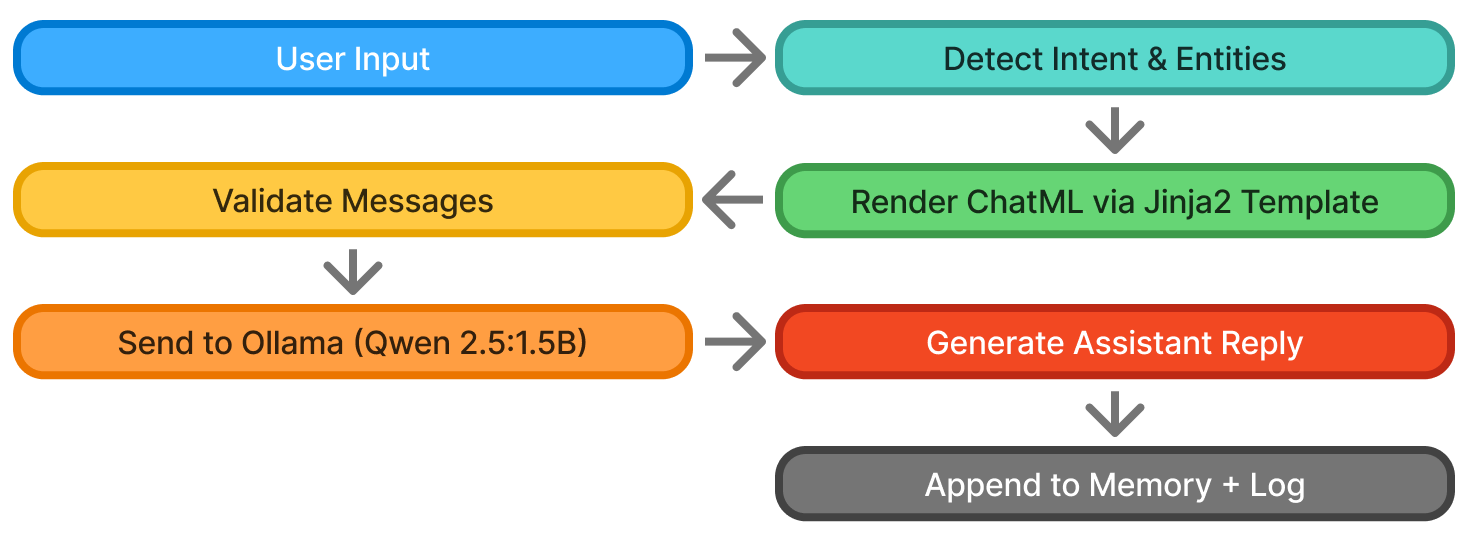
This flow mirrors the live execution pipeline of the Support Bot v3.4, where each <|im_start|> block moves through the system predictably and traceably.
2.10 Summary
A ChatML message is far more than formatted text — it’s a unit of structured reasoning.
Key Takeaways
<|im_start|>and<|im_end|>define clear message boundaries, removing ambiguity.
- The role tag assigns authority and behavioral context.
- Messages include metadata, enabling traceability and analytics.
- Structured flow enables tool invocation, memory, and auditable logs.
- In Support Bot v3.4, ChatML provides the bridge between user requests and deterministic model responses.
💡 A single ChatML message is to conversation what a class definition is to code — structure, hierarchy, and intent combined in one form.
💡 ACME is not a real company — it’s a teaching device. You can imagine it as any business you want your support bot to represent.