Chapter 4: Context and Continuity
How Memory and Context Persistence Enable Multi-Turn Dialogue
ChatML was designed not just for clarity, but for continuity. This chapter explores how conversation history, context persistence, and structured memory turn single-turn prompts into dynamic, evolving dialogues. Using the ACME Support Bot v3.4 as a working example, we’ll understand how role-based message chains, JSON memory stores, and ChatML context flows allow an assistant to “remember” and reason across turns — safely and predictably.
context management, conversation continuity, ChatML state, multi-turn dialogue, conversation memory, context window, message history
4. Context and Continuity
If roles define who is speaking, then context defines what has already been said — and memory defines what should be remembered.
Large Language Models like Qwen2.5:1.5B are stateless by default — every prompt is processed independently unless we explicitly feed prior turns. ChatML, when paired with structured memory, provides the missing glue: a framework for multi-turn reasoning, context persistence, and temporal awareness in dialogue.
In this chapter, we’ll explore how the ACME Support Bot v3.4 implements and maintains conversational memory through ChatML-based architecture.
4.1 Why Context Matters
Natural conversations rely on continuity.
When a customer asks:
“Where is my order 145?”
“And can you change the delivery address?”
The second question assumes that the assistant remembers which order is being discussed.
Without context, the AI would treat both questions as isolated — like two strangers speaking without history.
Context is the bridge between turns — the invisible thread that keeps dialogue coherent.
In LLM systems, context provides:
- Continuity – connects the dots across turns
- Relevance – informs responses based on prior topics
- Personalization – tailors output to the user’s situation
- Memory safety – controls what persists and what resets
In short, context turns a chatbot into a conversational partner.
4.2 How ChatML Preserves Context
ChatML’s strength lies in its structured format — a sequence of role-tagged messages.
Each message explicitly defines who said what, and the model uses this ordered sequence as the conversation state.
Example – Multi-Turn Context
<|system|>
You are ACME Support Bot. Be polite and concise.

<|user|>
Where is my order 145?

<|assistant|>
Your order 145 has been shipped and will arrive by November 10.

<|user|>
Can you change the delivery address to D-402, Sector 62, Noida?
Here, the model sees the entire context chain, not just the last message.
It can infer that “the delivery address” refers to order 145 because the sequence preserves referential memory.
This continuity is achieved not by magic, but by feeding the full ChatML history each time the model is invoked.
4.3 The Role of Memory in Support Bot v3.4
In the Support Bot implementation, conversational memory is explicitly persisted between turns — stored, updated, and reloaded for each session.
Memory Structure (data/memory.json)
Each session (like "default") holds a full transcript of the interaction in ChatML-compatible format.
{
  "default": [
    {"role": "system", "content": "You are ACME Support Bot..."},
    {"role": "user", "content": "Where is my order 145?"},
    {"role": "assistant", "content": "Your order 145 has been shipped."},
    {"role": "user", "content": "Can you change the address to D-402,
        Sector 62, Noida?"}
  ]
}
When the next user message arrives, the backend:
- Retrieves the session history (
get_history(session_id))
- Appends the new message
- Sends the entire conversation to Ollama (Qwen2.5:1.5B)
- Stores the assistant’s response via
append_message()
This ensures temporal consistency — the model always sees what it said before.
4.4 ChatML Context Chain – The Memory Timeline
We can visualize the conversation as a timeline:
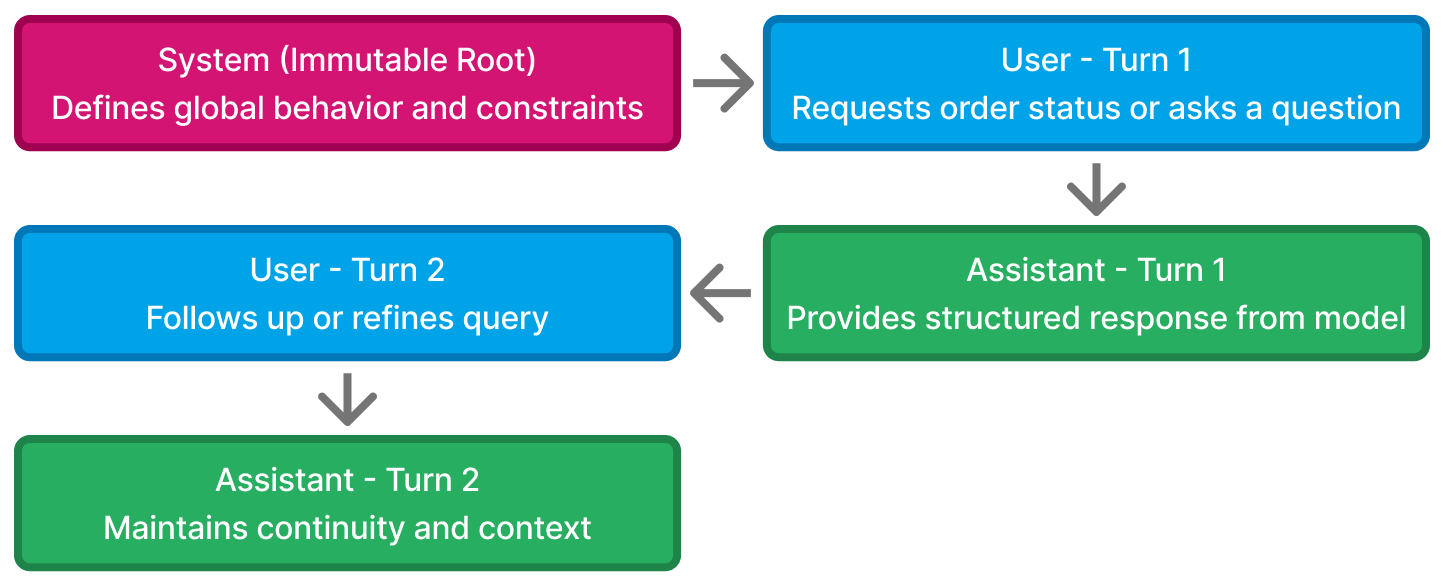
Each turn adds to the context stack, forming a “chain of thought” that evolves over time.
The key to stability is managing what stays and what resets:
- The
systemmessage always stays (defines policy) - The
userandassistantmessages evolve with each interaction - Outdated or irrelevant turns can be trimmed for efficiency
4.5 Implementing Context in Code
Support Bot’s memory handling is both lightweight and transparent — implemented via utils/memory_manager.py.
Key Functions
1. get_history(session_id)
Loads all previous messages for the given session.
def get_history(session_id):
    with open("data/memory.json", "r") as f:
        memory = json.load(f)
    return memory.get(session_id, [])
2. append_message(session_id, role, content)
Adds a new message to the session memory.
def append_message(session_id, role, content):
    with open("data/memory.json", "r+") as f:
        memory = json.load(f)
        memory.setdefault(session_id, []).append({"role": role,
            "content": content})
        f.seek(0)
        json.dump(memory, f, indent=2)
This small mechanism underpins ChatML persistence — every conversation turn becomes part of a structured ledger.